34

There are tutorials all over the web on how to set various functionalities to activate on a keyboard shortcut, but so far I'm unable to figure out how to un-set a keyboard shortcut. That is, how do I set a keyboard shortcut to disabled once I've already set it to something else?

For example, say I want to change the keyboard shortcut for "Launch Terminal". I go into System Settings, select Keyboard > Shortcuts and under Launchers, next to Launch Terminal I click on the word Disabled which then changes to New shortcut. I hit Ctrl+t or something like that and now the shortcut is set.

How now do I change it back to Disabled?

Daniel Quinn
  • 614
  • 1
  • 5
  • 12
  • It would be far easier to answer this question if you explain what mechanism you used to set the shortcut. As it is, I could guess at least a half dozen different ways you _might_ have done it. – msw Mar 14 '12 at 03:42
  • I've updated the question with more detail to that effect. I hope that helps. – Daniel Quinn Mar 14 '12 at 07:42

1 Answers1

42

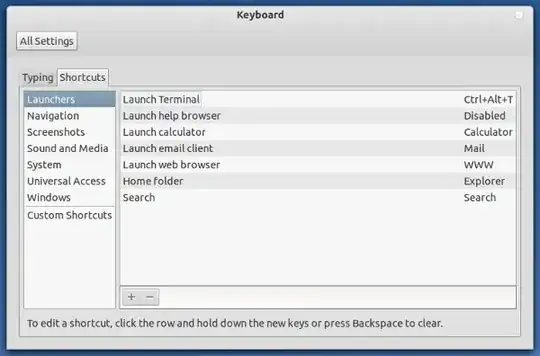
Is this (similar to) what you see?

GNOME Shell Keyboard Shortcuts

If so, try clicking on the activated keybinding (e.g. "Ctrl+Alt+T" in the screenshot1) and press Backspace to clear it (as mentioned at the bottom of the window)

(No idea how to remove a disabled shortcut, gconf-editor maybe?)

(1) which I snitched from this blog

sr_
  • 15,224
  • 49
  • 55
  • 4
    Wow, I feel dumb. Honestly, I tried everything to un-set that save reading the fine print at the bottom :-/ – Daniel Quinn Mar 14 '12 at 16:15
  • 2
    @DanielQuinn it happens to us all at some point ;) – msw Mar 14 '12 at 18:48
  • 2
    @msw: This is just what I was about to say... `:)` – sr_ Mar 14 '12 at 20:08
  • 3
    @DanielQuinn I got into that dialogue and also didn't see the instruction to hit Backspace; so I had to google this answer. You're a hero for asking the question. – Marcin Jan 29 '14 at 22:57
  • 1
    I'm using Debian 7.8 in portuguese and the bottom text says to press "barra de espaço para limpar" (spacebar to clear), but not working. Backspace is correct. Thanks. – thiagobraga Apr 29 '15 at 01:08
  • I too didn't have the revolutionary idea of reading the entire window... :/ Woe betide ye who wish to redefine Backspace, I guess! – underscore_d Apr 17 '16 at 14:18
  • 2
    gnome 3.22 has no textual hint anymore. would never make it without this answer... – Emmanuel Touzery Jun 08 '17 at 06:22
  • 2
    No hint on the window and on a dialog. It just says press ESC to cancel, but using Backspace on the assignment dialog is key here. @sr_ thx! – WooYek Jun 08 '17 at 13:26
  • Wow, that was completely unintuitive (Gnome 3 with Debian 9). – user30747 Aug 08 '17 at 16:01