13

I have installed Proxmox and wanted to create a VM by using the Proxmox web interface GUI (now the version is 2.0-38/af81df02)

However I have problem to find my Guest VM OS installation CD/DVD ISO file in the web GUI interface.
enter image description here

There is no ISO file can be found even I am very very sure I have copied the Ubuntu ISO file into the /home/ISOs directory which I have created in the "storage" tab.
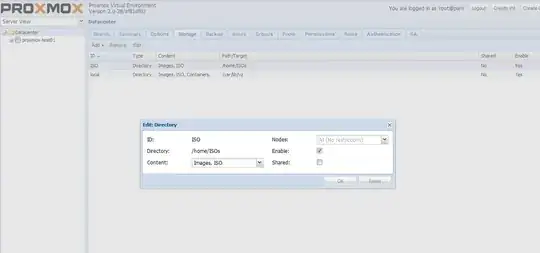
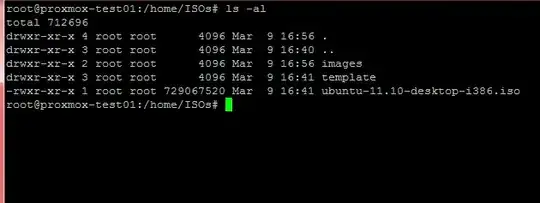
enter image description here

enter image description here

Why I cannot find the "Installation Media File" in Proxmox after I have copied it to the correct local directory and created the correct path in the Proxmox "storage" tab?

Xianlin
  • 1,013
  • 5
  • 14
  • 20
  • I have found the solution: You can upload you ISO files to **/var/lib/vz/template/iso** directory on Proxmox server. Then when you choose the default storage "local" you will see your iso files. The solution details are found at [link](http://blog.gambliser.com/2012/02/how-to-create-a-new-virtual-machine-on-promox-system/) – Xianlin Mar 12 '12 at 03:49

3 Answers3

25

You'll have to place the ISO in the /var/lib/vz/template/iso folder for it to be recognized by Proxmox.

To break it down:

  • Backups - /var/lib/vz/dump
  • ISOs - /var/lib/vz/template/iso
  • Images - /var/lib/vz/images
  • Templates - /var/lib/vz/template/cache

Cheers!

ghr
  • 103
  • 4
Mick
  • 261
  • 3
  • 4
8

You can upload ISOs via the web interface by selecting a storage (e.g. local) in the tree, then selecting the Content tab and then clicking the Upload button. The dialog which pops up allows you to upload ISOs which are then available in the storage when creating VMs.

Frerich Raabe
  • 201
  • 2
  • 4
0
/var/lib/pve/local-btrfs/template/iso

что-бы проверить файлы можно следующей командой

du -h | sort -h
iDominiqe
  • 1
  • 1
  • Welcome to the site. Please translate your answer to English, since this is the designated language of communication here. – AdminBee Aug 04 '23 at 10:55