23

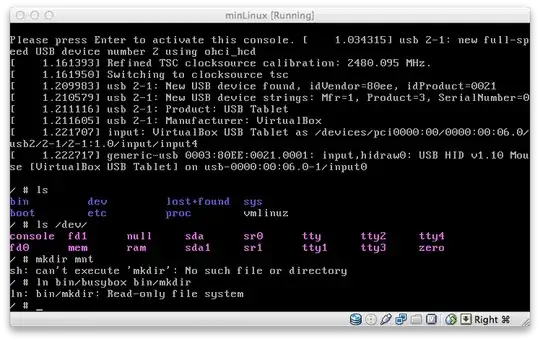
I've put together a small system with busybox, a Linux kernel, and a small file system, putting stuff in as it seemed necessary -- I don't know if I've been learning much from this, but I started out pretty clueless, so it sure hasn't been a smooth ride. So I suspect I might be missing some stuff in my filesystem, but I'm really not sure what I might need to add next.

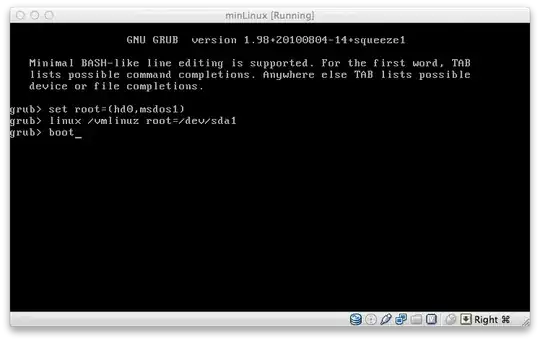
I can boot into my system by typing in the following grub commands: set root=(hd0,msdos1) \ linux /vmlinuz root=/dev/sda1 \ boot
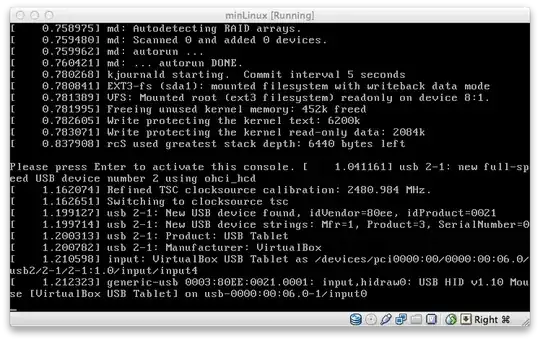
Once the boot messages stop, I'm left with this (I'm not sure if it's related but there's a line there that says: VFS: Mounted root (ext3 filesystem) readonly on device 8:1): boot message
I can't modify the filesystem: ln: bin/mkdir Read-only file

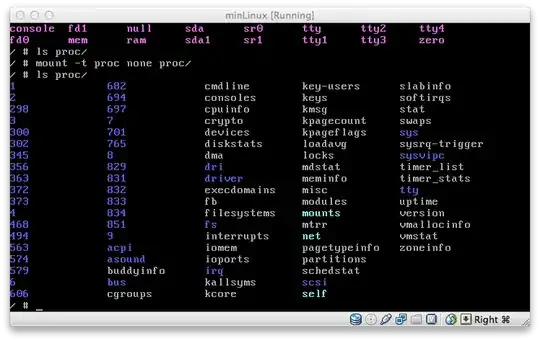
It's funny because I can manually mount /proc just fine: mounting /proc
Why is my file system read-only? What would I need to set up to get it to work?

math4tots
  • 2,665
  • 8
  • 32
  • 42
  • 6
    It's not unusual for a system to boot `/` readonly at first and then remount it rw later on. (I think the idea is that one would like to get to binaries like the file system check e2fsck in `/sbin/` without risking breaking anything.) – Ulrich Schwarz Feb 27 '12 at 11:33
  • 2
    maybe your filesystem is corrupt, have you tried to check it ? – Coren Feb 27 '12 at 13:16

3 Answers3

24

I had a similar issue that is not solved with the solution above. Linux may mount a drive as 'read-only' because of Fastboot on Windows 10. A shutdown with the Fastboot feature keeps the Windows kernel and session running albeit it closes all applications and logs off users. By turning off Fastboot, windows will do a cold shutdown and linux will be able to mount the drive safely. You will loose the fast windows boot as a consequence.

To turn-off fast-boot on windows 10 do the following:

  1. Go to Control Panel.
  2. Click Power Options.
  3. Choose "what the power buttons do."
  4. Click "Change settings that are currently unavailable."
  5. Find and uncheck "Turn on fast startup."
  6. Save changes.
  7. Shutdown and boot linux.

References: https://itsfoss.com/solve-ntfs-mount-problem-ubuntu-windows-8-dual-boot/ https://www.howtogeek.com/243901/the-pros-and-cons-of-windows-10s-fast-startup-mode/

Diaz
  • 341
  • 2
  • 3
21

Try to search in dmesg | less.

If you would like remount it to read-write, use mount -o remount,rw /

Amin Soheyli
  • 103
  • 4
Jan Marek
  • 3,837
  • 1
  • 14
  • 12
2

@Diaz Great advice, solved my issue. However, the "Turn on fast startup" didn't turn up in my Windows 10 installation. So I disabled the feature directly in the registry:

HKEY_LOCAL_MACHINE\SYSTEM\CurrentControlSet\Control\SessionManager\Power\HiberbootEnabled=0

Booted Debian and voila - SDD rw again.

jamacoe
  • 398
  • 3
  • 13