When I'm at work, I use KDE activities and map them to my projects. I always use the same applications on every project, so I'd like to keep my windows visible when I change the activity. For the moment, what I do is go through every window, right click on the title bar, and check the checkbox that makes the window appear on all activities. How can I configure my windows default value for this choice? I'd like every window to appear on all activities by default.
Asked
Active
Viewed 3,481 times
3 Answers
11
This question may be old, but I think I have found the perfect solution.
- Go to System Settings > Window Behaviour > Window Rules
- Add a new Rule
- Mark all window properties as 'Unimportant'
- Select all 'Window' types like in the screenshot
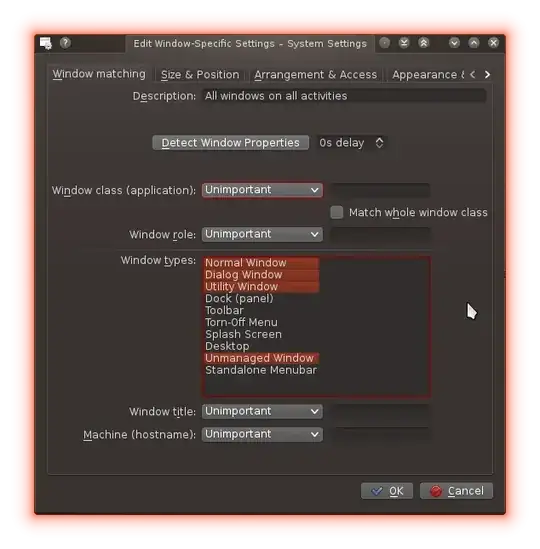
- In the tab 'Size & Position', tick 'Activities' and configure it as 'Apply initially' and 'All Activites', like in the screenshot
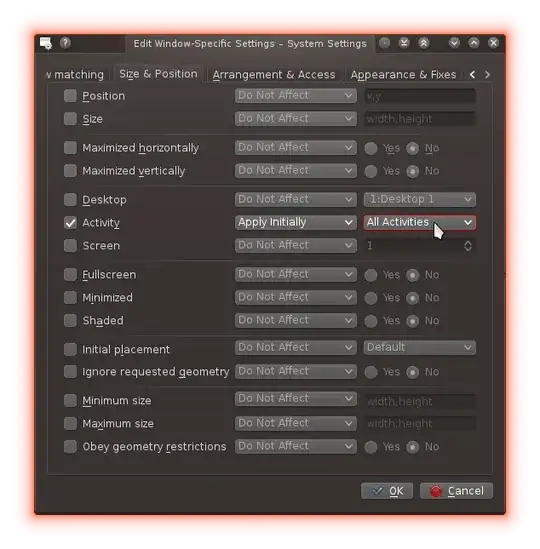
- Click 'Ok'
This should set all windows to be on all activities by default.

evertheylen
- 241
- 2
- 9
-
Looks awesome! I can't wait to test that at work tomorrow! And yes, the question is old, but the problem is still very present. – greg0ire Jan 08 '14 at 21:08
-
1Woops, forgot to test until now, but it works like a charm! Many, many thanks! – greg0ire Jan 16 '14 at 14:27
-
In the mean time, the answer is old as well, but this still works :-) The settings are under System Settings > Window Management > Window Rules now. The (new?) Detect Window Properties button makes things easy, as you can click an existing window and use its settings to create rules. – AstroFloyd Nov 12 '21 at 12:40
1
It's not elegant, but might help. Idea that comes to my mind is to search for such windows with xwininfo or xdotool search --name WINDOWNAME and then try to "inject" mouse clicks or - this is easier - keystrokes ( example: xdotool search --name WINNAME key ctrl+c. that results in such setting ( "alt+space" usually gets WM window options, later arrows... this should be possible to do by keystrokes injection ).

Grzegorz Wierzowiecki
- 13,865
- 23
- 89
- 137
-
Not very elegant indeed, but if there is no other solution, I guess I should look into that... – greg0ire Jan 26 '12 at 21:47
-
That's why I've wrote it. If nothing better will be around, try this shot. – Grzegorz Wierzowiecki Jan 26 '12 at 23:43
-
I've tried to find out on http://community.kde.org/Main_Page and http://techbase.kde.org/index.php?title=Special%3ASearch&search=activity and http://api.kde.org , but with no success. – Grzegorz Wierzowiecki Jan 27 '12 at 21:01
-
It seems there is no solution just the workaround you and I proposed... [for the moment](https://bugs.kde.org/show_bug.cgi?id=285055) – greg0ire Feb 05 '12 at 14:35
-
Or solution needs going down to C++ implementation. I tried checking out API, but I haven't seen anything suitable. – Grzegorz Wierzowiecki Feb 06 '12 at 08:24
1
I asked the question here : http://forum.kde.org/viewtopic.php?f=111&t=98797&p=211999#p211999 and it appears not closing the windows when shutting the computer down makes them reappear on startup with the same options, which is a good workaround for this problem.

greg0ire
- 2,925
- 3
- 25
- 37