20

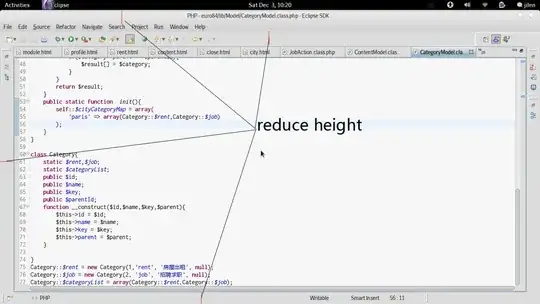
In Eclipse on Fedora, these controls/widgets take up too much space:

Eclipse Fedora screenshot

How can I make those bars thinner with a gtk-rc file or GTK3 CSS theming?

UPDATED : I found https://github.com/jeeeyul/eclipse-themes this plugin have some builtin configurations and options makes eclipse 4.2/4.3 much more nicer.

jilen
  • 767
  • 2
  • 7
  • 20
  • 4
    GTK3 and Gnome3 made Eclipse pretty much unusable on tiny screens. The new tab and toolbar sizes are a desaster. It shows how much the Gnome3 crowd lives in the world of arts where toolbar buttons much work for touch screens. :-( – Has QUIT--Anony-Mousse Dec 23 '12 at 16:45

6 Answers6

17

The default GNOME3 themes are a disaster for tiny screens. However, the Gnome3 crowd seems to be pretty unwilling to listen to their users. They only think of how stuff looks, in particular on a tablet PC or mobile device, it seems. Soon, Gnome3 will require a 4k screen.

Anyway, the best solution I have found is to switch the theme to the XFCE themes. On Ubuntu and Debian you should be able to install them via apt install gtk3-engines-xfce gtk2-engines-xfce. Then you can use the gnome-tweak-tool to change the theme. I'm currently using XFCE-orange theme, and it has much less padding than the default Gnome3 desaster "Adwaita". Plus, it doesn't use that depressing black for half of the applications! I think the tooltips in Eclipse were also broken with Adwaita.

I'm slowly switching from Gnome3 to XFCE on my computers, one after another. Because Gnome3 keeps on getting less and less useful for me, as I'm not your average "joe clueless" user that the Gnome3 people consider to be their only audience. I'm fed up with them breaking things for me. Now they've just announced to discontinue the panel which I'm using instead of the broken by design gnome-shell.

For eclipse specifically, I suggest to

export SWT_GTK3=0

in your ~/.profile. GTK3 with Eclipse is just a crazy waste of screen space.
  • Hm, I turned to elementary os for days. It works pretty fine, in spite of some outofdate apps(svn,emacs,gnu globa,etc) http://elementaryos.org – jilen Dec 24 '12 at 02:34
  • I'd stick with the well maintained stuff. Ubuntu and Debian bring e.g. LXDE and XFCE out of the box. When annoyed by the Gnome paternalism, the last to turn to is another group of "we know better than you what you need"-evangelists. I want **choice** to do things my way (e.g. use eclipse on a small screen). – Has QUIT--Anony-Mousse Dec 24 '12 at 11:13
  • Yes, Stable stuff means much more to me. – jilen Jul 29 '13 at 15:05
  • 2
    Even 3 years later with eclipse MARS on linux mint with cinnamon, `export SWT_GTK3=0` is improving (read: decreasing menu bar height) a lot. – Harald Nov 15 '15 at 11:22
  • Wow! That actually works so well, and here I'm settling with what I can do by editing the CSS. Thank you! – mikeymop May 09 '16 at 18:02
  • This was related to how Eclipse was handling the new GTK 3 - and after a few years, supposedly it has been fixed in Eclipse Neon - see [Bug 456345](https://bugs.eclipse.org/bugs/show_bug.cgi?id=456345). – G. Demecki Jun 19 '16 at 15:11
  • @G.Demecki Well, Neon is not out *yet*, and Mars is still horrible with GTK 3. And while apparently some of the issues were resolved, I'm still concerned that the margin and padding with GTK3 will waste a lot more space than it did with GTK2. – Has QUIT--Anony-Mousse Jun 19 '16 at 16:02
  • I partially agree. But this problem with Eclipse hasn't started with GTK 3 - it was present **for years** with GTK 2. Unfortunately with Gnome 3 it became even more visible due to bigger paddings/ margins etc. and also Eclipse has its own bugs. That's why for Eclipse, I'm personally still using GTK2 and my own gtkrc settings for paddings, margins and fonts. – G. Demecki Jun 20 '16 at 10:41
2

Eclipse chrome theme have font size, corner size options. It works with eclipse 4.x https://github.com/jeeeyul/eclipse-themes

jilen
  • 767
  • 2
  • 7
  • 20
2

Can you also use / convert GTK2 themes? If so, I highly recommend Martin Ankerl's nice compact version of Clearlooks.

jstarek
  • 1,672
  • 2
  • 16
  • 32
  • I used this, but it makes menu item too narrow. I really want to reduce the places i point out in the figure above – jilen Dec 16 '11 at 12:05
2

You can install a new eclipse theme. I know "extended VS presentation" which is a very minimalistic theme. Check out: http://andrei.gmxhome.de/skins/index.html

Additionally you can install a fullscreen plugin which gives you some little extra space. Check it out here: http://www.scharf.gr/eclipse/fullscreen/update/

Also the thing you have on the bottom, left and right, you can just click and drag it to the top into the same toolbar (so in the end you just have one). If they do not fit in (depending on your screen resolution), go into Window->Customize Perspecitve... and turn them off.

This is what it looks like (without fullscreen). I'm also using editbox plugin.

lenooh
  • 131
  • 4
  • Is that a black menubar for eclipse? or Is that a global menu? (if so what did you use?) – mikeymop May 09 '16 at 18:04
  • It's the original eclipse menu, using the fullscreen extension. I don't remember exactly, as it was 4 years ago, but certainly it's not unity's global menu. – lenooh May 10 '16 at 13:12
0

See this solution, it works perfectly on Linux Mint 16 Petra 64

http://ubuntuforums.org/showthread.php?t=1465712

  • 3
    Welcome to the U&L Stack Exchange site. While your answer addresses the question, please avoid [link-only answers](http://meta.stackexchange.com/questions/8231/are-answers-that-just-contain-links-elsewhere-really-good-answers). It would be better if the answer would contain enough information to stand on its own, and link to the source of the information as a reference. – Thomas Nyman Dec 03 '13 at 06:26
0

I partially agree with @Anony-Mousse, but this problem with Eclipse hasn't started with GTK 3 or Gnome 3 - it was present for years with GTK 2.

Unfortunately with Gnome 3 it became even more visible due to bigger paddings/ margins etc. and also Eclipse has its own bugs (see e.g. Bug 456345). That's why for Eclipse, I'm personally still using GTK2 and my own gtkrc settings for paddings, margins and fonts.

Complete solution which I'm using can be found in this gist.
And it works really nice.

G. Demecki
  • 101
  • 2