I have been trying to install Canon laser printer LBP2900B in Linux Mint 17.2 Cinnamon 32bit.
Whenever I give a print order monitor will say " printing" ! After 2 seconds it will say," printing cancelled " !
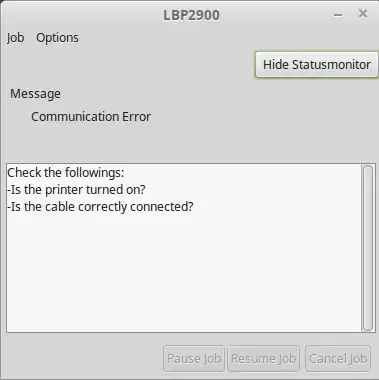
When i check the printer status( captstatusui -P LBP2900),the message i am getting is:
Communication error:
    - is the printer turned on ?
    - is the cable correctly connected ?
I reconnected the cable,still the same error message !I am not getting " Ready to print " message after running the command captstatusui -P LBP2900
[
And in the terminal it says: "(captstatusui:8733): GLib-CRITICAL **: Source ID 10 was not found when attempting to remove it "
I tried many versions of CAPT driver from canon site including latest 2.7 ! The main link i referred is:
http://www.e-lokam.com/internetsoftware/cannon-lbp-2900b-printer-installation-in-mint-16/
Another link itried :
https://radu.cotescu.com/how-to-install-canon-lbp-printers-in-ubuntu/


