29

I am using GNOME 3.18.1 on Arch Linux 4.2.5-1-ARCH x86_64 on a Dell E6530 laptop. Since I installed this OS years ago, the power button on my laptop has always led my OS to completely power down.

However, in the last few weeks this behaviour has changed, so that pressing the power button now puts my laptop into energy savings mode. I did not change my power settings. I always keep my system up to date using pacman -Syyu, however, so I suspect that an update changed this functionality.

In the power settings there is no option for this.

How can I restore the initial behaviour, so that pressing that button powers the system off?

Konrad Höffner
  • 996
  • 1
  • 16
  • 26

9 Answers9

23

That's caused by the latest gnome-settings-daemon updates...
There is no such option in power settings because it was removed by the GNOME devs (the shutdown/power off action is considered "too destructive").
Bottom line: you can no longer power off your laptop by pressing the power off button.


You could however add a new dconf/gsettings option (i.e.shutdown) to the settings daemon power plugin if you're willing to patch and rebuild gnome-settings-daemon:

--- gnome-settings-daemon-3.18.2/data/gsd-enums.h   2015-11-10 09:07:12.000000000 -0500
+++ gnome-settings-daemon-3.18.2/data/gsd-enums.h   2015-11-11 18:43:43.240794875 -0500
@@ -114,7 +114,8 @@
 {
   GSD_POWER_BUTTON_ACTION_NOTHING,
   GSD_POWER_BUTTON_ACTION_SUSPEND,
-  GSD_POWER_BUTTON_ACTION_HIBERNATE
+  GSD_POWER_BUTTON_ACTION_HIBERNATE,
+  GSD_POWER_BUTTON_ACTION_SHUTDOWN
 } GsdPowerButtonActionType;

 typedef enum
--- gnome-settings-daemon-3.18.2/plugins/media-keys/gsd-media-keys-manager.c    2015-11-10 09:07:12.000000000 -0500
+++ gnome-settings-daemon-3.18.2/plugins/media-keys/gsd-media-keys-manager.c    2015-11-11 18:47:52.388602012 -0500
@@ -1849,6 +1849,9 @@

         action_type = g_settings_get_enum (manager->priv->power_settings, "power-button-action");
         switch (action_type) {
+        case GSD_POWER_BUTTON_ACTION_SHUTDOWN:
+                do_config_power_action (manager, GSD_POWER_ACTION_SHUTDOWN, in_lock_screen);
+                break;
         case GSD_POWER_BUTTON_ACTION_SUSPEND:
                 do_config_power_action (manager, GSD_POWER_ACTION_SUSPEND, in_lock_screen);
                 break;

Once you install the patched version, a new shutdown option will be available in dconf-editor under org > gnome > settings-daemon > plugins > power > power-button-action:
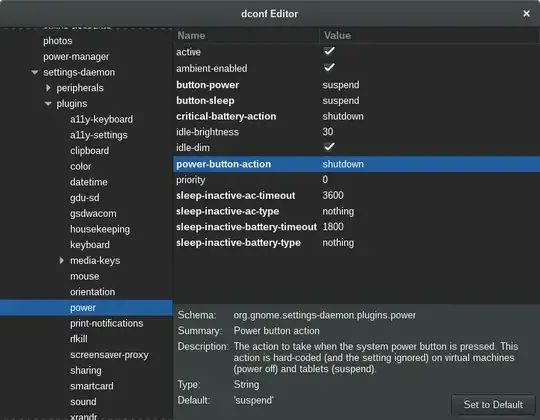
enter image description here

so select that to shutdown via power button or, if you prefer CLI, run in terminal:

gsettings set org.gnome.settings-daemon.plugins.power power-button-action shutdown

Sure, for the above to work you also need the right settings in /etc/systemd/logind.conf:

HandlePowerKey=poweroff
PowerKeyIgnoreInhibited=yes

Keep in mind that pressing the power button will shutdown your system without any warning.

don_crissti
  • 79,330
  • 30
  • 216
  • 245
  • 12
    That is very disappointing, I always thought Linux is the OS where the user decides what he wants even if it is dangerous. But thank you very much for finding this out, at least I don't waste my time in the search of a nonexisting fix then. – Konrad Höffner Nov 12 '15 at 18:13
  • Thank you very much for the detailed solution. Despite having gnome-settings-daemon 3.18.2-1, my installation has different files, however: `gsd-enums.h` is in the folder `/usr/include/gnome-settings-daemon-3.0/gnome-settings-daemon/` and `gsd-media-keys-manager.c` does not exist at all. – Konrad Höffner Dec 03 '15 at 09:51
  • Dev has reversed his decision and restored the interactive option in [gnome-settings-daemon 3.20](https://bugzilla.gnome.org/show_bug.cgi?id=755953#c29). (I think. I haven't updated to that version yet.) – idbrii Sep 20 '16 at 16:07
  • 2
    @idbrii - well, I have some bad news for you: I'm on 3.22 and there's no shutdown option. – don_crissti Sep 20 '16 at 16:34
  • @don_crissti The "interactive" option presents the user with a dialog asking for an action (Restart, Power Off, or Cancel). If there's no input in 60 seconds, it powers off. Not as good as a direct shutdown action, but at least you can power off your system with the power button again. Source: https://access.redhat.com/documentation/en-us/red_hat_enterprise_linux/7/html/desktop_migration_and_administration_guide/setting-behavior-of-particular-buttons – Jonathan Aug 21 '23 at 13:12
17

In Ubuntu 18.04 or any similar Linux variants with acpi (if not you can probably install), make a file called /etc/acpi/events/power with

sudo nano /etc/acpi/events/power

and put

event=button/power
action=/sbin/poweroff

inside the file, close it, then

sudo service acpid restart

This is probably the simplest solution that definitely works.

  • 3
    This solutions works great in my situation : ubuntu server 18.04 with gnome-desktop installed and in headless mode (not necessary when a display is connected). Thanks ! – M-Jack Jan 25 '19 at 09:36
  • After trying so many "solutions" that either didn't work or only worked once, this finally is an actual solution! Why would the way of solving something like this even involve fiddling with gimmicky desktop environment settings? – UTF-8 Nov 23 '20 at 13:29
  • Thank you so much! Rewrote it as an automated copy pasta fix: ```sudo cat > /etc/acpi/events/power << 'EOF' event=button/power action=/sbin/poweroff EOF sudo service acpid restart ``` – Lukas Willin Mar 27 '23 at 12:14
12

As @don_crissti explained, the situation is silly because it really isn't possible to just shutdown without confirmation using the normal settings.

However, there's a workaround: if the chassis type of the machine is set to "vm" (virtual machine), the old immediate shutdown behavior will take over any settings. Simply enter as root:

hostnamectl set-chassis vm

and reboot once. I don't know of any side effects of this settings.

Lorenzo Pistone
  • 708
  • 1
  • 8
  • 20
  • 2
    I've followed this power-button issue for a long time [link](https://unix.stackexchange.com/questions/301778/centos7-on-nuc-suspends-when-power-button-is-pressed/301798#301798) Our application has a keyboardless / mouseless configuration "view only" mode that needs to be turned off by non-technical staff every night. When the ability to shut down with power button was lost, they would need to just pull the plug. This solution works great for us and is by far the easiest approach for us. – MikeV Apr 16 '18 at 22:44
  • This didn't work for me, I am not sure why. The `/etc/acpi/events/power` solution did though, perfectly. – tbeauvais Jun 05 '20 at 09:57
  • Great workaround, thx! Tested with 20.04. Note I needed this when no one is logged in. When someone is logged in the other, `gsettings` solution is enough. – MarcH Jun 20 '20 at 18:23
  • 1
    Side effect: airplane mode will not work (it'll be ignored). I tried to create a [pull request](https://gitlab.gnome.org/GNOME/gnome-settings-daemon/-/merge_requests/156) to allow an `embedded` chassis type to power off immediately (like `vm`), but it was not accepted. – Rael Gugelmin Cunha Oct 20 '20 at 16:04
  • On 20.04 for me it seems to have disabled X server for some reason. Had to "nvidia-xconfig --enable-all-gpus" to remake xorg.conf – Íhor Mé Jan 04 '21 at 21:26
  • This worked for me, and it's still working (I'm still running Ubuntu 18.04), except that after some time, something changed that made me have to push the power button _twice_ before anything happens. It's no big deal, I just push-push instead of push, but if someone can tell me why this happened and if I can make it work with one push, I'd appreciate it. – njlarsson Mar 23 '21 at 15:50
  • Oh great, it's broken again: now a screen is required for this to work, very ironic for a "vm". When no screen is connected power button presses are now ignored like this: `/usr/lib/gdm3/gdm-x-session[1736]: (II) event0 - Power Button: SYN_DROPPED event - some input events have been lost.` – MarcH Feb 04 '22 at 00:58
  • UPDATE: "fixed" by `systemctl mask gdm3` + a reboot. – MarcH Feb 04 '22 at 01:42
3

As an alternative, you can open up the keyboard settings window and assign a custom keyboard shortcut to the command gnome-session-quit --power-off, which will bring up the shutdown menu. I have it set to trigger by Super+q.

joelostblom
  • 1,889
  • 2
  • 19
  • 32
2

As a first step, you should make sure that Settings | Power (assuming Gnome v3) "Suspend & Power Off" / "Automatic Suspend" is set to off. Basically, disable GNOME power setting features and just let the system take over.

Sarah Weinberger
  • 662
  • 5
  • 13
  • 24
0

The custom keyboard shortcut works, I set it to gnome-session-quit --power-off --force by pressing only the power button, which is all that I wanted.

HalosGhost
  • 4,732
  • 10
  • 33
  • 41
xxx
  • 1
0

I found another option to accomplish this on Debian Stretch. I installed the package acpi-support-base and edited the file /etc/acpi/powerbtn-acpi-support.sh adding the following lines following the header comment and before any code.

## Bypass logic to force shutdown on power button
/sbin/shutdown -h -P now "Power button pressed"
exit 0

This is a bit of a blunt instrument but works for me on a desktop and should work on a laptop. It also bypasses the Gnome3 settings but is easier than patching Gnome and recompiling.

According to the Arch Wiki page on acpid this can probably be implemented by modifying /etc/acpi/handler.sh on Arch.

HankB
  • 111
  • 2
0

I worked around this problem on a server of mine by monitoring the log output of systemd-logind basically refining the solutions presented in other answers.

This workaround requires two files. The script that triggers the actual shutdown event

$ cat /usr/local/bin/shutdown_button_monitor.sh
#!/bin/sh

# ansible managed

# systemd-logind prints a line of the form 
# Dez 21 11:12:10 box03.yeepa.de systemd-logind[748]: Power key pressed.
# on key press, but doesn't handle the button because gnome3 blocks systemd from doing so.
# See `systemd-inhibit` for that.

# first sleep a minute so we have chance to disable this scritp if it runs amok
sleep 1m

# so we workaround gnome a bit here.
journalctl -u systemd-logind --follow --lines=0 | \
while read line ; do
    if echo "$line" | grep --quiet 'Power key pressed'
    then
        systemctl poweroff
    fi
done

and the service file that starts / restarts it

$ cat /etc/systemd/system/shutdown_button_monitor.service
# ansible managed

[Unit]
Description=Power off the machine if the power button is pressed
# Workaround for gnomes block of the shutdown button
# https://unix.stackexchange.com/questions/242129/gnome-3-how-to-set-power-button-to-shutdown-instead-of-suspend#242452
# Monitor these blocks yourself with `systemd-inhibit`

[Service]
User=root
ExecStart=/usr/local/bin/shutdown_button_monitor.sh
Restart=always
RestartSec=5

[Install]
WantedBy=multi-user.target
dwt
  • 1
-1

Some while ago I created this handy script: https://github.com/stackcoder/doublepress

It can prevent accidental shutdowns by requiring double pressing the power button. It also allows switching between standby and poweroff, or triggers your custom action.

stackcoder
  • 29
  • 2
  • This does not actually address the issue in the question at all. – Kusalananda Jan 21 '21 at 08:27
  • Indeed, the core question is "How can I restore the initial behaviour, so that pressing that button powers the system off?", and [an answer has been accepted](https://unix.stackexchange.com/a/242452/117549), so for the future, keep in mind that Answers should address the Question. This Answer could be salvaged by integrating that script to the OP's environment. – Jeff Schaller Jan 21 '21 at 17:08