29

I have several VMs and right now my command-line prompt looks like -bash-3.2$; identical on every VM, because it doesn't contain the host name. I need to always see which VM I'm on using hostname before I do any operation. How can I add the host name to the shell prompt?

ENV: CentOS/ssh

Gilles 'SO- stop being evil'
  • 807,993
  • 194
  • 1,674
  • 2,175
uday
  • 391
  • 1
  • 3
  • 8
  • 2
    I always use a prompt where I can easily copy it for a scp-command, so it is `export PS1='\u@\h:\w \$ '`. – ott-- Jul 24 '15 at 19:56

4 Answers4

26

Look into your ~/.bashrc or ~/.profile, there may be a commented prompt setup that should do what you want, like this one on our infra:

export PS1='\h:\w\$ '

Which looks like:

coolservername:~# 

Or if you plan on logging as non-root, you can use:

 export PS1='\u@\h:\w\$ '

to add username before the hostname.

You can have fun adding colours, multiline or whatever info you want in the prompt, a quick search on "bash prompts" should give you plenty of hints.

Archemar
  • 31,183
  • 18
  • 69
  • 104
Lukhas
  • 361
  • 2
  • 3
16

Just change the value of the $PS1 environment variable:

PS1="\h$ "

where \h is replaced with the hostname. Add that to /etc/bash.bashrc to set it permanent.

chaos
  • 47,463
  • 11
  • 118
  • 144
8

I like when the shell prompt shows the username, hostname and the name of the working directory. In addition, I like, when all of this is shown in colors. So I usually put

export PS1='\[\033[0;32m\]\u@\h:\[\033[36m\]\W\[\033[0m\] \$ '
 

in ~/.bashrc. In order to apply changes immediately, call

. ~/.bashrc

Also if you switch to root using su it is good to see bash prompt in a different color, so that you exercise extra caution. For this I add the line

export PS1='\[\033[0;31m\]\u@\h:\[\033[36m\]\W\[\033[0m\] \$ '

into /root/.bashrc. And call

. /root/.bashrc

to apply the changes. Then it looks like this
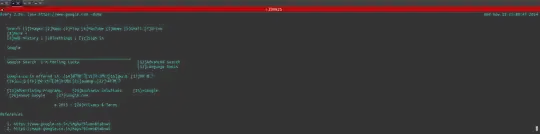
enter image description here

Very often VPS server admins provide dumb hostnames. In order to change it, open /etc/sysconfig/network and change the line

HOSTNAME=put_a_name_that_you_want_to_see_in_bash_prompt_here

If you want different colors for username@host part, you have to change 0;32m part in the first example, or 0;31m part in the second example. The list of available colors can be found here

Since .bashrc is executed for non-login shells, do not forget to double check that

if [ -f ~/.bashrc ]; then
         . ~/.bashrc
fi

is present in ~/.bash_profile, since ~/.bash_profile is executed at your login. And also add the same piece into /root/.bash_profile.

John Smith
  • 2,659
  • 1
  • 13
  • 19
0

As well as changing prompt there is an option in the configuration of konsole and the gnome terminal emulator, that will change the title bar (or tab title).

ctrl-alt-delor
  • 27,473
  • 9
  • 58
  • 102