7

I have a string with tab delimited data that looks like:

h1  h2
a1  b1
a2  b2

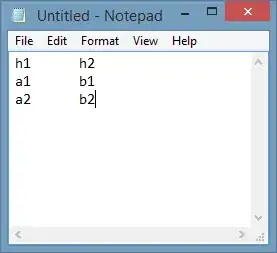
I produced it with Notepad on Windows. I created tab delimited data, ensuring that tabs and not spaces are used.
enter image description here

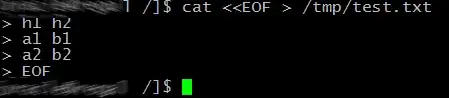
I connect to a Linux server via SSH using PuTTY. I would like to write the file to /tmp/test.txt and preserve the tabs. So I run cat <<EOF >/tmp/test.txt. I copy the text from Notepad and paste it into the putty session. Then I enter EOF.
enter image description here

However, that produces a file without tabs having the contents of:

h1h2
a1b1
a2b2

I've found that this works:

sed 's/\\t/\t/g' > /tmp/test.txt << EOF
h1\th2
a1\tb1
a2\tb2
EOF

However, it required that I change my input string to use '\t' instead of actual tabs. What is a more elegant/simple solution that allows me to take a string literal as-is from Windows and write it into a file on the remote Linux machine?

I am SSHed into a Linux server from Windows via putty. The server is:

  • Distribution: Red Hat Enterprise Linux Server release 6.6 (Santiago)
  • Bash version: 4.1.2(1)-release (x86_64-redhat-linux-gnu)
  • cat: coreutils-8.4-37.0.1.el6.x86_64
Random832
  • 10,476
  • 1
  • 34
  • 40
Elijah W. Gagne
  • 173
  • 1
  • 5
  • 1
    Which distribution, version and bash version do you use? – Cyrus Jun 09 '15 at 05:40
  • 1
    I've try `cat > file.txt` with `CTRL-D` in the last line in the FreeBSD's `csh` and everything goes perfectly. – Kondybas Jun 09 '15 at 07:15
  • @Cyrus, I updated the question with those details. – Elijah W. Gagne Jun 09 '15 at 12:02
  • @Kondybas, you're suggestion works and is definitely better than my use of sed. I would be interested if there's an even better answer. – Elijah W. Gagne Jun 09 '15 at 12:03
  • With exact this RHEL and bash version I can't reproduce your problem. – Cyrus Jun 10 '15 at 21:38
  • 1
    `cat` just passes tabs through, like any other character. Here documents also pass tabs through. The problem is either that your script doesn't contain what you think it does or that what you're using to look at the output mangles it. If you need help figuring it out, you need to give us your exact script, not a script with potentially different whitespace. Post the output of `base64 – Gilles 'SO- stop being evil' Jun 11 '15 at 00:12
  • @Gilles on my system, `cat > foo` and pasting will preserve tabs while `cat<foo` and pasting will not. I don't think there's any script involved here, the OP is pasting directly into the terminal. – terdon Jun 11 '15 at 13:38
  • @terdon, correct, there is no script involved. Later today, I will update the question to provide more details on repro steps. – Elijah W. Gagne Jun 11 '15 at 15:41
  • @ElijahW.Gagne just clarify that you're pasting the string. Also, why don't you just use `cat > file` as already suggested? That's the simplest solution. – terdon Jun 11 '15 at 15:44
  • @terdon correct, just pasting a string; question updated to be more clear. I agree that Kondybas' solution is nearly perfect and I would probably accept it as an answer if no better solution is found. I am still very curious to find out why the tabs are no being preserved though. – Elijah W. Gagne Jun 11 '15 at 15:55
  • 1
    Apparently, that's how heredocs work. I haven't found it documented explicitly but heredocs are just a needlessly complex way to do what you're attempting. It had never occurred to me to use them before since `cat > file` and pasting is so much simpler. That's the standard way it would be done. – terdon Jun 11 '15 at 15:58
  • 1
    @Kondybas it's probably worth adding that as an answer since the OP was unaware of it. – terdon Jun 11 '15 at 15:59
  • @terdon If you're doing that, you're pasting into your shell's editor. It presumably does completion when you press Tab, rather than inserting a tab. Elijah, you stated in your question that the input to `cat` contained tabs. If you copy-pasted into a shell running in a terminal, so that you were *not* directly passing some known input into `cat`, you need to mention that, it isn't something we can guess. – Gilles 'SO- stop being evil' Jun 11 '15 at 17:04
  • @Gilles, thanks, I appreciate your edit and agree that the question is now outlined much better. When I originally posted, it did not occur to me that those details would matter. – Elijah W. Gagne Jun 11 '15 at 17:14
  • Hello @ElijahW.Gagne I didn't find a way to PM you in stackexchange so I tried to PMd you through Facebook on this, if it's okay, could we please have a few words? I am having a similar issue here: https://unix.stackexchange.com/questions/424940/make-bash-ignore-all-tab-indentations-whatsoever – Arcticooling Feb 18 '18 at 13:16
  • @user9303970 I missed your message on Facebook. It looks like the link to your question doesn't work. If you want to update that, I'll take a look. – Elijah W. Gagne Feb 19 '18 at 13:59

4 Answers4

4

When you type into a shell, the shell recognizes some characters as commands. For example, the carriage return character (the character sent by the Enter key) causes the shell to execute the command. The tab character causes the shell to perform completion. When you paste something into the PuTTY terminal window, from the shell's point of view, that's the same thing as if you'd typed these characters. So at the point the tab character is pasted, the shell performs completion, it doesn't insert a tab.

The easiest way to copy a file without it being transformed would be to use PuTTY's companion program PSCP or PSFTP to copy the file. This is the simplest way conceptually, but it does have the overhead of running another program, authenticating, choosing a directory, etc.

If you want something inline, you can paste directly into cat, rather than in a here document. Then you'd be pasting into the terminal's line editor, not into the shell's line editor. As the terminal's line editor is very primitive, only a few control characters have a special meaning there, not including tab. Press Ctrl+D at the beginning of a line to terminate the input.

[darkstar /]$ cat >text.txt
Paste
Ctrl+D
[darkstar /]$ 

I you want to transfer arbitrary data over a medium that interprets control characters, you can encode it into a form that uses only “tame” characters. Base64 is one; it doesn't use any control character and ignores whitespace and newlines. GNU coreutils, which is part of the basic installation on Linux and Cygwin, includes a base64 command. On the sender side, run base64 <file-to-decode, e.g.

  • On Windows: run base64 c:/path/to/test.txt from a Cygwin terminal
  • Copy the output.
  • In the shell in the PuTTY window, type `base64 -d >/tmp/test.txt and press Enter.
  • Paste the output from base64.
  • Press Ctrl+D.
Gilles 'SO- stop being evil'
  • 807,993
  • 194
  • 1,674
  • 2,175
  • Note pscp or psftp (or in Windows 10 up the 'native' scp and sftp ported from OpenSSH) copy the file byte-for-byte -- and a file created with notepad will almost always have CRLF line endings, which when copied to any Unix system frequently cause trouble unless you remember to remove them (for which there are numerous options such as tr -d '\r', sed 's/.$//', dos2unix) – dave_thompson_085 Aug 19 '22 at 01:40
  • (After testing) it's also _possible_ to run bash with --noediting; then tab is not handled specially, and can be used as data in a heredoc. But this takes the entire UI back to the 1980s and makes it barely usable; I don't recommend it. – dave_thompson_085 Aug 19 '22 at 01:52
1

I'm not entirely sure what problem you're having - on my RHEL install, cat works if I give it tab stops. However as a more general solution perhaps:

 #!/usr/bin/perl

 use strict;
 use warnings; 

 while ( <> ) { 
     s/\s+/\t/g; 
     print;  
 }

Will take 'input' on either STDIN (catted into) or as filenames (e.g. myscript.pl <filename>) and convert all whitespace to tab stops.

Sobrique
  • 4,404
  • 14
  • 24
1

If you would like a more simple solution than perl script, you can use sed, anyway that perl script is simple too.

echo "hello    world" | sed 's/\(\t\+\)/\t/g'

Anyway, using redhat 5 I don't see any problem using cat command

rpm -qf $(which cat)
coreutils-5.97-34.el5
c4f4t0r
  • 649
  • 5
  • 11
  • 1
    Thank you so much. Even using echo I am seeing the tabs removed. I am pasting from Windows into Linux via SSH using putty. I am now highly suspicious that that's the issue. However, when I edit the file with vi and paste, the tabs are preserved. – Elijah W. Gagne Jun 09 '15 at 12:56
0

The bash manual explains (on [n]<<[-]word):

If any part of word is quoted, the delimiter is the result of quote removal on word, and the lines in the here-document are not expanded. If word is unquoted, all lines of the here-document are subjected to parameter expansion, command substitution, and arithmetic expansion, ...

while cat >/tmp/test.txt <<'EOF' might do, it does not: TABs are still expanded. As it seems to be the readline library, there is a somewhat easy solution:

user@host:~> bash --noediting
user@host:~> cat >/tmp/test.txt <<EOF

(paste your data now)

EOF
user@jhost:~> exit

(leave the extra shell)

Another tool to exchange files between Windows and SSH-enabled UNIX is WinSCP.

U. Windl
  • 1,095
  • 7
  • 21