4

For about 15 years I have assigned a workspace to each function key (F1-F10) in whichever Linux/X environment I'm using. Yesterday I ran a normal software update on my work Ubuntu box and now, although I can still use ccsm to assign those keys to the Viewport Switcher it has no effect unless I also assign some modifier such as alt-, which is very annoying. (I'm using metacity on 14.04).

Does anyone know what might have changed in the last couple of weeks? I had been on holiday so the update was quite large. More importantly, how do I fix it?

Keyboard menu screenshot

Nagora
  • 91
  • 3

2 Answers2

0

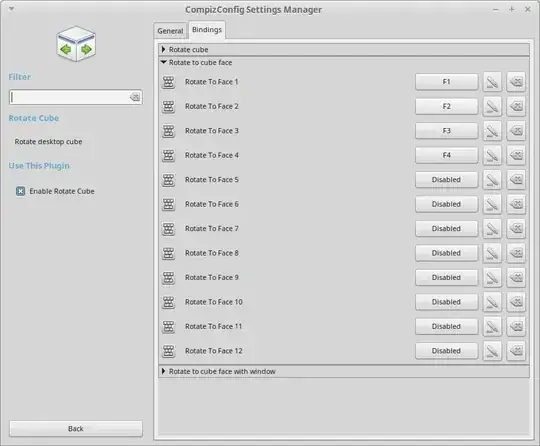
In CCSM (Compiz Config Settings Manager), there is the "Rotate Cube". You can change the KeyBindings there, as shown in the screenshot:

enter image description here

As shown in the screenshot, I customized them to F1, F2, F3, F4 and they work perfectly fine.

Using Viewport Switcher

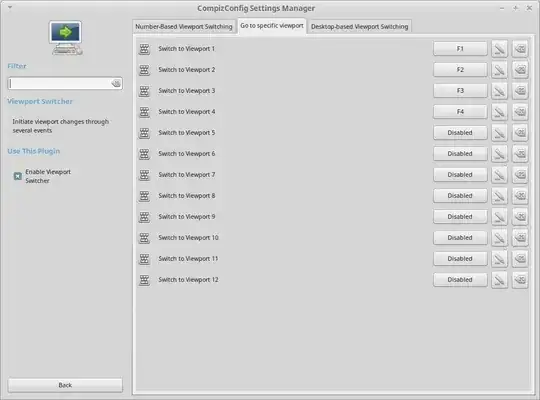
If you do not wish to use "Rotate Cube" and wish to use the good old Viewport Switcher, then first enable Desktop Wall in Compiz, and then enable Viewport Switcher. Then, in Viewport Switcher, you modify the keybindings.

Note that the important thing here is that you will need to enable the Desktop Wall plugin so that your keybindings in Viewport Switcher work.

Screenshot-1 : Showing the enabled plugins:

enter image description here

Screenshot-2 : Changing the keybindings:

enter image description here

shivams
  • 4,505
  • 3
  • 19
  • 36
  • I don't seem to have a cube option at all. Is it an optional plugin or something? Just to be clear: it was working until yesterday using the keybindings in ccsm under "Viewport Switcher", which I guess is a 2D analog of the cube. – Nagora May 28 '15 at 11:13
  • Yes. "Rotate Cube" comes with the package `compiz-plugins` or `compiz-plugins-default`. – shivams May 28 '15 at 11:17
  • @Nagora I've updated the answer so that you can modify your `Viewport Switcher` keybindings without using the `Rotate Cube` plugin. – shivams May 28 '15 at 11:23
  • I checked but that is basically what I have. As long as it's plain old "F3" (or whatever) nothing happens, but if I change it to "F3" then it works as expected. my metacity version is 2.34.13 and ccsm is 0.9.11.3. Does Ubuntu keep a log of updates done via the Software Updater app? – Nagora May 28 '15 at 11:33
  • @Nagora Okay.. in that case, why don't you use Compiz itself as the window manager.... to change the window manager you'll have to edit your gconf settings... – shivams May 28 '15 at 15:04
0

Open the 'System Settings' app, select Keyboard, select the shortcuts tab, then select Navigation from the menu. There will web "Move window to workspace X" options for each workspace, set them there.

Aido
  • 166
  • 14