1

I'm running Damn Small Linux. When you open the command prompt, you are automatically logged in as the default user called dsl and granted root privileges (with sudo). How can I set a password for the default user called dsl, so that when I open a command prompt, I have to enter a password?

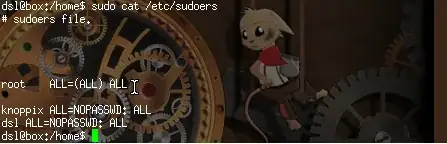
I tried passwd dsl but when I open the command terminal, I don't get prompted by a password. enter image description here
Gilles 'SO- stop being evil'
  • 807,993
  • 194
  • 1,674
  • 2,175
David Lo
  • 23
  • 5
  • When you say "open the command prompt", do you mean "open a terminal emulator window"? I.e. you're already running an X desktop session? If so, you're already logged in, the desktop is running with "dsl" privileges. – wurtel May 08 '15 at 06:59
  • @wurtel Yes , but I want to place a password . Is this possible to do this? – David Lo May 08 '15 at 07:07
  • I'm not familiar with damn small linux, apparently that boots up into the desktop without asking any password? The documentation for DSL should explain how this should be done. I expect you can check if the password works by hitting ctrl-alt-f1 which should switch to the console which should have a login prompt. Hit ctrl-alt-f7 (or one of the other function keys if it's configured differently) to switch back. – wurtel May 08 '15 at 07:13
  • @wurtel , no luck . Thanks for the help wurtel – David Lo May 08 '15 at 07:16
  • It sounds like you have installed DSL in *single user mode*: there are some instructions online for converting from single user to multiuser (either by manually editing the inittab and bash_profile files, or by choosing a preconfigured inittab.multi file), but I don't know how current they are. – steeldriver May 08 '15 at 11:59

1 Answers1

1

Use the passwd command and enter a password when prompted. Do the same as root to set a password for the root account — it's useless to have a password on some user account if you don't have one for root.

Note that you type the password when you log in, not when you open a new terminal window. It would be completely useless to require a password to open a terminal window, since a lot of software let you move files around or execute arbitrary commands.

If you're running the live system, you'll need to do this every time you boot. You can make the changes persistent by adding /etc/passwd and /etc/shadow to the list of configuration files to save. If you install to the hard drive, you'll be prompted for passwords during installation.

Gilles 'SO- stop being evil'
  • 807,993
  • 194
  • 1,674
  • 2,175
  • Its not suggested that you edit /etc/shadow and /etc/passwd by hand using your prefered file editor due to risk of a problem such as file corruption occuring. Instead you should use the **vipw** command to alter the passwd file and **vipw -s** to alter the shadow file. – programmer May 31 '19 at 11:22
  • @Qasim Indeed, but here there's no reason to edit those files directly, even via `vipw`. Just call `passwd` normally. – Gilles 'SO- stop being evil' May 31 '19 at 12:04
  • true but in case he is running a live system then its a different case – programmer May 31 '19 at 13:19