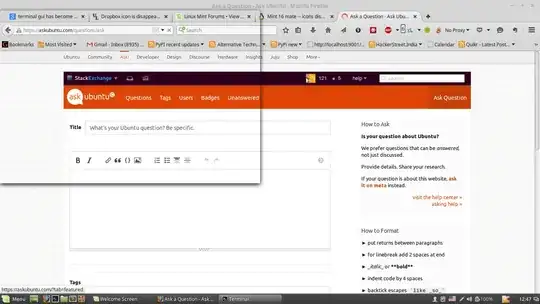
The terminal has gone invisible , although I can type commands and they get executed:
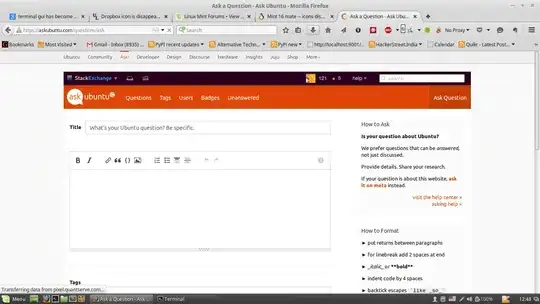
Even some firefox download dropdowns are invisible, I can click the items in the drop down list but the list itself is invisible(see the down arrow highlighted but the drop down list is invisible):
Some system details:
~> stty --all
speed 38400 baud; rows 24; columns 80; line = 0;
intr = ^C; quit = ^\; erase = ^?; kill = ^U; eof = ^D; eol = M-^?; eol2 = M-^?;
swtch = M-^?; start = ^Q; stop = ^S; susp = ^Z; rprnt = ^R; werase = ^W;
lnext = ^V; flush = ^O; min = 1; time = 0;
-parenb -parodd cs8 hupcl -cstopb cread -clocal -crtscts
-ignbrk brkint -ignpar -parmrk -inpck -istrip -inlcr -igncr icrnl -ixon -ixoff
-iuclc ixany imaxbel iutf8
opost -olcuc -ocrnl onlcr -onocr -onlret -ofill -ofdel nl0 cr0 tab0 bs0 vt0 ff0
isig icanon iexten echo echoe echok -echonl -noflsh -xcase -tostop -echoprt
echoctl echoke


~ # sudo inxi -U
Starting inxi self updater.
Currently running inxi version number: 2.2.19
Current version patch number: 00
Updating inxi in /usr/bin using svn server as download source...
Successfully updated to svn server version: 2.2.19
New svn server version patch number: 00
To run the new version, just start inxi again.

    Aspire-5745 ~ # inxi -Fxz
System: Host: -Aspire-5745 Kernel: 3.13.0-37-generic x86_64 (64 bit gcc: 4.8.2)
Desktop: Cinnamon 2.4.6 (Gtk 3.10.8~8+qiana)
Distro: Linux Mint 17.1 Rebecca
Machine: System: Acer (portable) product: Aspire 5745 v: V1.19
Mobo: Acer model: JV51_CP Bios: INSYDE v: V1.19 date: 22/03/2011
CPU: Dual core Intel Core i5 M 460 (-HT-MCP-) cache: 3072 KB
flags: (lm nx sse sse2 sse3 sse4_1 sse4_2 ssse3 vmx) bmips: 10109
clock speeds: max: 2534 MHz 1: 1199 MHz 2: 1199 MHz 3: 1199 MHz
4: 2534 MHz
Graphics: Card: Intel Core Processor Integrated Graphics Controller
bus-ID: 00:02.0
Display Server: X.org 1.15.1 drivers: intel (unloaded: fbdev,vesa)
tty size: 80x24 Advanced Data: N/A for root
Audio: Card Intel 5 Series/3400 Series High Definition Audio
driver: snd_hda_intel bus-ID: 00:1b.0
Sound: Advanced Linux Sound Architecture v: k3.13.0-37-generic
Network: Card-1: Qualcomm Atheros AR8151 v1.0 Gigabit Ethernet
driver: atl1c v: 1.0.1.1-NAPI port: 2000 bus-ID: 01:00.0
IF: eth0 state: up speed: 100 Mbps duplex: full mac:
Card-2: Broadcom BCM43225 802.11b/g/n driver: wl bus-ID: 02:00.0
IF: wlan0 state: down mac:
Drives: HDD Total Size: 500.1GB (82.3% used)
ID-1: /dev/sda model: Hitachi_HTS54505 size: 500.1GB temp: 36C
Partition: ID-1: / size: 23G used: 8.7G (40%) fs: ext4
I remember that I may have tried to unsuccessfully install Pycharm and SDL libraries before this happened. This happened after the system hanged and after I restarted my system I got this problem which is not going away. I tried a lot of things like restarting , changin theme colors, resetting terminal profile\colors\transparency etc post to various forums etc. but nothing worked.
Running sudo debsums -c:
/usr/share/initramfs-tools/scripts/casper-bottom/01integrity_check
/usr/share/initramfs-tools/scripts/casper-bottom/15autologin
/usr/share/cups/data/default-testpage.pdf
/usr/share/applications/evince.desktop
/usr/lib/firefox/browser/defaults/preferences/vendor-firefox.js
/usr/lib/firefox/distribution/distribution.ini
/usr/lib/firefox/distribution/searchplugins/locale/en-US/amazondotcom.xml
/usr/lib/firefox/distribution/searchplugins/locale/en-US/duckduckgo.xml
/usr/lib/firefox/distribution/searchplugins/locale/en-US/wikipedia.xml
/usr/lib/firefox/distribution/searchplugins/locale/en-US/yahoo.xml
/usr/lib/firefox/distribution/searchplugins/locale/en-GB/amazon-en-GB.xml
/usr/lib/firefox/distribution/searchplugins/locale/en-GB/chambers-en-GB.xml
/usr/lib/firefox/distribution/searchplugins/locale/en-GB/duckduckgo.xml
/usr/lib/firefox/distribution/searchplugins/locale/en-GB/wikipedia.xml
/usr/lib/firefox/distribution/searchplugins/locale/en-ZA/amazondotcom.xml
/usr/lib/firefox/distribution/searchplugins/locale/en-ZA/duckduckgo.xml
/usr/lib/firefox/distribution/searchplugins/locale/en-ZA/wikipedia.xml
/usr/share/icons/HighContrast/16x16/places/start-here.png
/usr/share/icons/HighContrast/22x22/places/start-here.png
/usr/share/icons/HighContrast/24x24/places/start-here.png
/usr/share/icons/HighContrast/32x32/places/start-here.png
/usr/share/icons/HighContrast/48x48/places/start-here.png
/usr/share/icons/HighContrast/scalable/places/start-here.svg
/usr/share/icons/gnome/16x16/places/ubuntu-logo.png
/usr/share/icons/gnome/22x22/places/ubuntu-logo.png
/usr/share/icons/gnome/24x24/places/ubuntu-logo.png
/usr/share/icons/gnome/32x32/places/ubuntu-logo.png
/usr/share/icons/gnome/scalable/places/ubuntu-logo.svg
/usr/share/applications/itweb-settings.desktop
/usr/bin/inxi
/usr/share/applications/libreoffice-math.desktop
/usr/lib/linuxmint/common/configobj.pyc
/usr/lib/linuxmint/mintInstall/Classes.pyc
/usr/lib/linuxmint/mintInstall/widgets/__init__.pyc
/usr/lib/linuxmint/mintInstall/widgets/pathbar2.pyc
/usr/lib/linuxmint/mintInstall/widgets/rgb.pyc
/usr/lib/linuxmint/mintInstall/widgets/searchentry.pyc
/usr/share/applications/openjdk-7-policytool.desktop
/usr/share/sounds/freedesktop/stereo/device-added.oga
/usr/share/sounds/freedesktop/stereo/device-removed.oga
/usr/share/polkit-1/actions/com.ubuntu.pkexec.synaptic.policy
/usr/share/applications/vino-preferences.desktop
/usr/share/applications/yelp.desktop


