0

I have upgraded a Debian 7 system to Debian 8 and, among other changes, when I log in using gnome-classic, the desktop background is new. However, my gnome menus have not changed, as you can see in this screenshot:
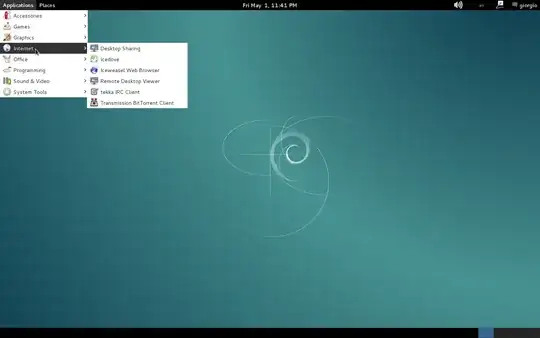
enter image description here

So, I have performed a fresh installation of Debian 8, and on that I get the following look and feel when I log in as gnome-classic:
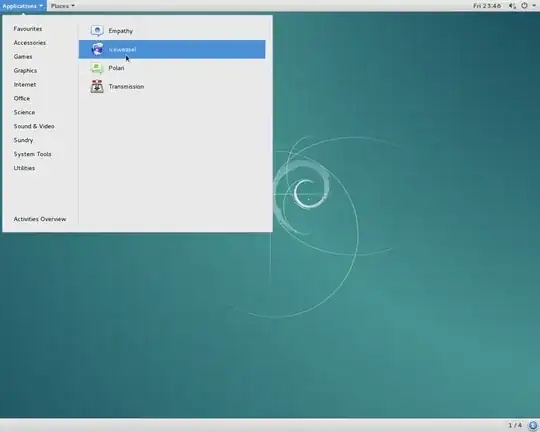
enter image description here

Why are the icons, the menu look and feel, and the upper tool bar different?

Can it be that some packages have not been upgraded properly when going from Debian 7 to Debian 8?

If this is the case, is it possible to restore the look and feel of the upper picture in Debian 8?

Giorgio
  • 797
  • 2
  • 13
  • 28

2 Answers2

3

i'm not sure that this is the answer you are asking for, but if want the look and feel of the "classic" gnome 2, you can install and use the MATE Desktop Environment (sudo apt-get install mate-desktop-environment)!

i would definitely advise you to use MATE instead of the old gnome3 classic-mode:

  1. MATE will use less resources
  2. the so called "classic-mode" of gnome 3, is just a fallback-mode if your system faces problems with the graphic card
  3. the classic-mode was discontinued as of gnome 3.6
    and debian squeeze (2.30+7), wheezy (3.4+7+deb7u1) or jessie (3.14+3) uses different versions of gnome by default!
DJCrashdummy
  • 509
  • 1
  • 5
  • 23
  • It could surely help. I basically would like to keep the wheezy - gnome-classic look and feel. – Giorgio May 01 '15 at 22:18
  • i'm not sure what's your goal... for the look it is irrelevant what system (wheezy/jessie, ubuntu, fedora,...) you use; it only depends on your desktop environment! -- if you like the look of gnome 3 install the latest gnome and you are fine... if you want back the look of the old gnome 2 install and use the now called MATE! – DJCrashdummy May 02 '15 at 12:58
  • forget the so called "classic-mode" of gnome 3, it's just a fallback-mode if your system faces problems with the graphic card! – DJCrashdummy May 02 '15 at 13:03
  • The gnome-classic was close enough to what I liked in wheezy, but apparently this has been changed in jessie. Many thanks, I will try out mate. – Giorgio May 03 '15 at 08:45
  • Anyway, what you see above is the following. The upper screenshot is from a wheezy system that's been upgraded to jessie. This is what I see when I log in using gnome-classic, and the look and feel was fine to me. The lower screenshot is from a newly installed jessie system. Again, this is what I see when I log in using gnome-classic. My goal was to have the upper look and feel (wheezy + gnome-classic) in jessie. But I will try out mate too. – Giorgio May 03 '15 at 08:48
  • 1
    maybe this is interesting for you: http://askubuntu.com/a/65087/354350 – DJCrashdummy May 07 '15 at 05:19
0

Maybe he want it because new Gnome in Debian 8 doesn't support 2D video cards any more (2005 Sis agp video card for example found in laptops). So he need old gnome to see a good image. On Sis agp video card Debian 8 it seems it lack's driver support so use some "new" driver that is no good at all. And is not only with Sis, Ati and Nvidia too !

  • Thanks for your answer. Actually I would like to keep the look and feel when switching to a new version. In any case, I do not want to be forced to adopt a new look and feel, I would like to choose between keeping the old one and switching to a new one. The possibility to choose has always been one reason I use Linux. So I do not see why it should be difficult to keep the old desktop alongside the new ones. – Giorgio Jun 07 '15 at 09:32