2

So the Win10 Tech Preview will be expiring tomorrow. I need a change. I am trying to install OpenSUSE, but I'm not quite confident where I should designate the Linux partition. I put in the install DVD and boot up YaST. I am greeted by this table:
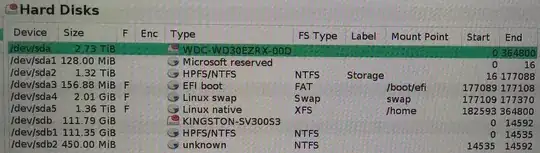
Hard disk partition table

I have two drives. One is a 120GB SSD. The other is a 2TB HDD. I want to install SUSE on the SSD, but adding a new partition doesn't appear to do the trick.

  1. I resize sdb1 to 70 GiB and free up 41.35 GiB of space
  2. I create a new primary partition (41.34 GiB, OS Role, ext4 filesystem)

Accepting this setup leads to a warning.

Warning: Some subvolumes of the root filesystem are shadowed by mount points of other filesystem. This could lead to problems. Really use this setup?

How can I prevent this from causing problems?

roaima
  • 107,089
  • 14
  • 139
  • 261
anthony
  • 81
  • 1
  • 9
  • I suspect that the problem lies with the linux partitions on /dev/sda. I don't remember putting those there. Can I safely delete sda4 and sda5? – anthony Apr 15 '15 at 01:13

2 Answers2

2

That is a mess of partitions you have going on.

I would just start over and do a custom partitioning job and don't let YaST make any suggestions.

At that point, it'll leave your 2TB alone. Then you should be able to resize your SSD and install.

SailorCire
  • 2,423
  • 1
  • 15
  • 23
  • Can I redo all the partitions and still keep the data already on the drives? I suspect that if I delete sda4, sda5, and sdb2, it should be cleared up. Problem is, I don't have a drive big enough to make a backup. Otherwise, I would be fiddling with it. – anthony Apr 18 '15 at 03:57
  • 1
    @anthony it would be unwise for me to give advice without knowing what your drives looked like before you tried to install. – SailorCire Apr 18 '15 at 16:13
  • Yeah, you're right. That was an unfair question. I think I'll burn the whole lot to DVDs and mess around with it. – anthony Apr 19 '15 at 05:00
0

The error message explains it. You already have /boot/efi and /home. Do You have there any other Linux installation? If yes, You can in YaST remove mount point for those partitions (on sda) and make new required partitions. If not, boot from some Linux live CD or so and check what is on those partitions. If You delete them in YaST, You delete the content. If You have UEFI, there must be /boot/efi partition (I'm not sure if not on the beginning of the disk). So, I'd first check what is on all disks and then start again.

Tilia
  • 280
  • 1
  • 2
  • 11