How to remove the ESC characters in black background from Notepad++ v6.7.3
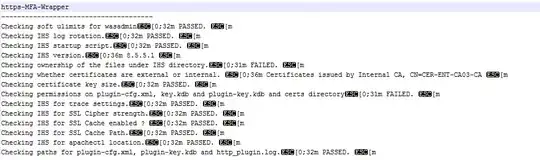
How to remove the ESC characters in black background from Notepad++ v6.7.3

What should be removed is not simply the ASCII escape character, but the entire escape sequence, which terminates the the "m".
In Notepad++, you can substitute regular expressions. Using an answer by @progm as a starting point, this expression will search for escape sequences for colors:
\x1b\[[0-9;]*m
Tick off Search Mode = Regular expression, and click Find Next.
Further reading:


