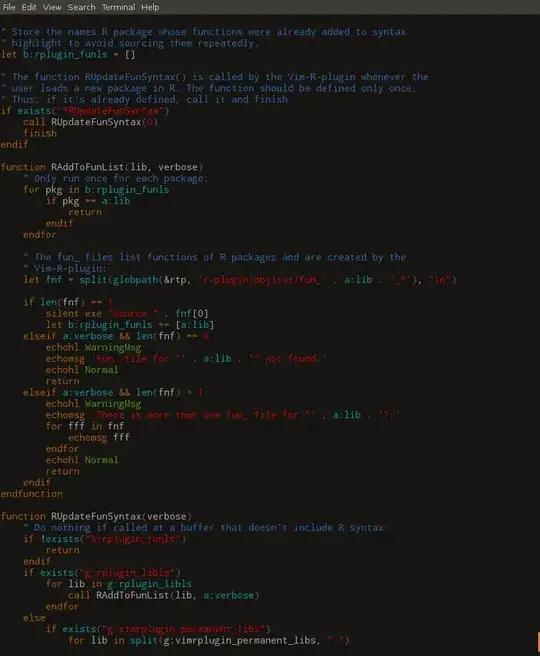
Is there a variant of cat that outputs syntax-highlighted lines of code when used on a source file?
An idea: maybe vi[m] or another editor can be asked to dump the syntax-highlighted contents of said files to stdout and exit immediately?
Is there a variant of cat that outputs syntax-highlighted lines of code when used on a source file?
An idea: maybe vi[m] or another editor can be asked to dump the syntax-highlighted contents of said files to stdout and exit immediately?
Passing the file through pygmentize-f terminal will attempt to detect the type from the filename and highlight it appropriately.

The Source-highlight package is shipped with the esc.outlang output language definition, which highlights with ANSI escape sequences.
A handy wrapper src-hilite-lesspipe.sh is also included in the package, so displaying highlighted output in the terminal is just src-hilite-lesspipe.sh source.file.
Actually src-hilite-lesspipe.sh's primary reason is to help automating the use of source-highlight with less. You just set:
export LESSOPEN="| /path/to/src-hilite-lesspipe.sh %s"
export LESS=' -R '
Then any less source.file will show highlighted source code. (Code in unknown language will pass through unaltered. Highlighting will be also skipped in case of redirected content, like less < source.file.)


Based on @Mikael Öhman's comment on @Ignacio Vazquez-Abrams's answer, I wrote this Python program to use pygments if possible or else use cat.
#! /usr/bin/env python3

from argparse import ArgumentParser
import subprocess
import os
import os.path


def main():
    parser = ArgumentParser(description='cat alternative that uses ANSI characters')
    parser.add_argument('file', help='the file to print out the contents of', type=str)
    args = parser.parse_args()
    if not os.path.isfile(args.file):
        parser.error(f'file not found: {args.file}')
    cat = False
    result = subprocess.run(('pygmentize -f terminal256 -O style=native ' + args.file).split(), stdout=subprocess.PIPE,
        stderr=subprocess.PIPE,
    )
    if result.stderr:
        cat = True
    commands = {
        True: 'cat ',
        False: 'pygmentize -f terminal256 -O style=native '
    }
    os.system(commands[cat] + args.file)


if __name__ == '__main__':
    main()