I have a really small space reserved to Lynx for a quick lookup, as I need that often. However, the "Help" menu takes a lot of space and I don't really need it now.
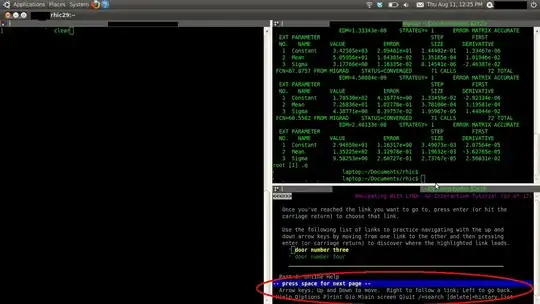
The red oval is what I want to get rid of. How to do it?
I have a really small space reserved to Lynx for a quick lookup, as I need that often. However, the "Help" menu takes a lot of space and I don't really need it now.
The red oval is what I want to get rid of. How to do it?


Press o to change the options. In the very first preference “User mode”, select “Advanced” (“Novice” has the huge help, “Intermediate” has a one-line help, and “Advanced” shows the selected URL in the modeline). Check the “Save options to disk” box then follow the “Accept” link at the top.
The corresponding setting in ~/.lynxrc is
user_mode=ADVANCED
Aside: I prefer w3m to lynx. It has tabs, does better rendering and can show images. In its preferences, be sure to turn on “Display link URL automatically”. Also useful: Yanking URLs in w3m.
Set Lynx to advanced mode. Options, user mode, advanced.
  General Preferences
  User mode                        : [Advanced___]
  Editor                           : ________
  Type of Search                   : [Case insensitive]

