22

I sometimes want to write special Unicode characters, like an em-dash (—), in various programs like vim, Chrome (like just now!), or LibreOffice.

In LibreOffice, I can achieve this via a dedicated dialog box found under the Insert menu. Other programs don't seem to have a built-in way. My solution in these cases is to look up the character on Wikipedia, copy it, and paste it in.

Is there a universal way to write Unicode characters in any program that accepts text input in Linux without having to copy and paste from somewhere where it's already printed?

Gilles 'SO- stop being evil'
  • 807,993
  • 194
  • 1,674
  • 2,175
drs
  • 5,363
  • 9
  • 40
  • 69
  • You could have search for "Unicode input" on Wikipedia. Now mentioned in my answer. – vinc17 Feb 17 '15 at 22:26
  • In LibreOffice (and MS Office) there is also a list of automatic substitutions, like `(C)` -> `©`. Quite often, people configure `--` as en-dash and `---` as em-dash. – Simon Richter Feb 17 '15 at 23:17
  • `Is there a universal way...` No. (I'm not aware of a "universal" way to do **anything** via programming.) – user2338816 Feb 18 '15 at 04:44

3 Answers3

16

Either you can enable an Compose key, or you can press CtrlShiftU followed by the Unicode hexadecimal number of the character (leading zeroes can be skipped). For example, Æ is CtrlShiftU, then C6. This works on GNOME Terminal, Terminator, Google Chrome and a number of other applications, with Xterm (and according to comments, Emacs) not working.

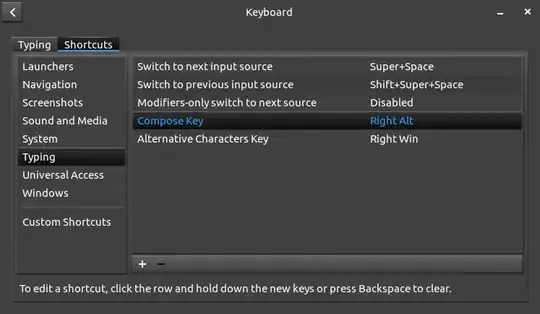
On GNOME, to enable Compose, go to the Keyboard settings, then ShortcutsTypingAlternative Characters Key and map it to something (say, Right Alt). Then you press the Compose key, and - thrice to get an em-dash: —. (The arrows in this paragraph are all Compose->.)

enter image description here

Gilles 'SO- stop being evil'
  • 807,993
  • 194
  • 1,674
  • 2,175
muru
  • 69,900
  • 13
  • 192
  • 292
  • 2
    The Ctrl+Shift+u solution doesn't work in Xterm and in Emacs. It doesn't work in Firefox either. – vinc17 Feb 17 '15 at 21:04
  • 2
    @vinc17 it does work in Firefox for me. I have neither Xterm or Emacs to test on. – muru Feb 17 '15 at 21:09
  • Hmmm, yes, it works in Firefox, but I have to type the Space key after the hexadecimal sequence. In any case, this is not universal, but probably a feature added by some applications (or some window managers?). Also, it doesn't work in Opera. – vinc17 Feb 17 '15 at 21:11
  • AltGr is just a modifier to get additional key combinations. This is what I use to enter the characters listed in my answer (e.g. Shift+AltGr+[ gives ←). But the user can also map characters to other keys such as function keys; this is what I do to get the French accented characters: éèêëâîôûàùïç. Everything done via XKB settings. – vinc17 Feb 17 '15 at 21:21
  • @vinc17 I made an epic fail. I was talking about Compose and said AltGr instead. – muru Feb 17 '15 at 21:27
  • Yes, Compose is another solution. One can probably use both. I don't have enough physical keys on my keyboard to get Compose on its own key, but I suppose that it is possible to configure XKB so that AltGr+Alt gives the Compose key, for instance. Note that for diacritics, there is also the dead key mechanism (which I also use: AltGr+[ gives the dead acute accent on my machines with my own XKB settings). – vinc17 Feb 17 '15 at 21:34
  • The [Ubuntu help article](https://help.ubuntu.com/community/ComposeKey) is more clear about the Ctrl-Shift-U feature. Still none of the forms work with Xterm and Emacs. With rxvt-unicode, it is similar, but without the "U". In VLC, it doesn't work at all. And only the second form works with GNOME Terminal. It could be a GTK feature (not available in Emacs, though). – vinc17 Feb 17 '15 at 21:45
  • @vinc17 Both work for me in GNOME Terminal, in VLC only Compose works. Compose works on both Xterm and Urxvt (same thing as rxvt-unicode?) – muru Feb 17 '15 at 21:50
  • @vinc17 ctrl-shift-u works in xterm on ubuntu 14.04 for me, just requires hitting space afterwards to combine the codes into the character – Izkata Feb 17 '15 at 21:57
  • Compose or AltGr should work everywhere since this is provided at XKB level (i.e. it doesn't need specific application support). I've updated my answer concerning the particular case of Emacs. – vinc17 Feb 17 '15 at 21:58
  • @Izkata For me, Ctrl-Shift-U doesn't work with xterm on Ubuntu 14.04.1, via SSH remote connection and X11 forwarding. So, I suspect that the feature you're seeing comes from your desktop environment (or it could be an XKB feature I'm not aware of, not enabled on Debian by default). – vinc17 Feb 17 '15 at 22:13
  • 1
    @vinc17 Whether Ctrl+Shift+U works depends on your input method. – Gilles 'SO- stop being evil' Feb 17 '15 at 22:27
  • @Gilles If I understand correctly, the adequate input method is not available in Debian yet: https://bugs.debian.org/cgi-bin/bugreport.cgi?bug=594920 – vinc17 Feb 17 '15 at 23:17
  • Compose does work in xterm (likely works with Emacs as well). The virtual keyboard may have confused the answerer. – Thomas Dickey Mar 29 '15 at 10:12
8

The best way is still to type the character on your keyboard. Thanks to XKB, you can bind arbitrary Unicode characters to key combinations. For instance, with user XKB customization, I can type directly: ← → ↑ ↓ … € ½ « » — − ± ≠ ∩ ∪ ⊂ ∧ ∨ ∀ ∃ √ ∞ ≤ ≥, etc.

Note: in the particular case of GNU Emacs, Unicode composition can be done via Ctrlx+8+Return. See Ctrlx+8+Ctrlh for additional methods.

"Unicode input" on Wikipedia gives information about ISO 14755 Unicode input depending on the context, in particular for X11 with some toolkits and for specific applications (Emacs, Opera, Vim).

Alternatively, you can use the Compose key with user-defined settings (as the default settings are far from being complete). Documentation is provided by the Compose(5) man page. For instance, write a file $HOME/.XCompose containing:

include "%L"
<Multi_key> <bracketleft> <c>           : "⌈" U2308 # LEFT CEILING
<Multi_key> <bracketright> <c>          : "⌉" U2309 # RIGHT CEILING
<Multi_key> <bracketleft> <f>           : "⌊" U230A # LEFT FLOOR
<Multi_key> <bracketright> <f>          : "⌋" U230B # RIGHT FLOOR

The include "%L" line first loads the default (locale-specific) Compose file, and the next four lines add user-defined settings, such as: Compose+[+c gives the left-ceiling character "⌈" (U+2308).

vinc17
  • 11,912
  • 38
  • 45
  • You don't need XKB to bind Unicode characters to key combinations, you can also do it with xmodmap. You won't be able to reach all Unicode characters that way though, there are just too many. – Gilles 'SO- stop being evil' Feb 17 '15 at 22:27
  • 1
    @Gilles xmodmap is not as powerful as XKB and [I had problems with it in the past](https://bugs.freedesktop.org/show_bug.cgi?id=11822). Hence my switch to XKB. Moreover I don't use all Unicode characters. For rare characters, an on-screen picker may be the best solution, because one may not know their codepoint and how to enter them. – vinc17 Feb 17 '15 at 22:49
  • I don't understand how do you enter ∩ ∪ ⊂ ∧ ∨ ∀ with compose. The rest « » € ₤ ö etc. works. But not the math symbols. – Igor Chubin Jan 27 '18 at 09:28
  • @IgorChubin I do not use compose, just `ISO_Level3_Shift` (a.k.a. AltGr). I've just edited my answer to give a link to my web page explaining [user XKB customization](https://www.vinc17.net/unix/xkb.html). – vinc17 Jan 28 '18 at 02:17
  • @vinc17 Thank you, I will read more about it. Do you know any advantages of this method comparing to compose? – Igor Chubin Jan 28 '18 at 16:16
  • @IgorChubin The Compose method typically needs more keys (3 or more). However, much more combinations are possible. I've edited my answer to mention the Compose method with user-defined settings, so that you can choose your own key combinations for your own characters. – vinc17 Jan 29 '18 at 17:24
  • @vinc17 Yes, thank you, but the question is how to configure compose for that (if some character are not supported by compose by default) – Igor Chubin Jan 29 '18 at 21:34
  • @IgorChubin I've added an example, following the [`Compose(5)`](https://linux.die.net/man/5/compose) documentation. – vinc17 Jan 30 '18 at 11:24
  • @vinc17 Thank you very much. Now your answer is even better – Igor Chubin Jan 30 '18 at 18:31
3

As described in detail in this post, there's a great way to do add unicode keys without having to remember any awkward key combinations or use any drop down menus.

It boils down to using Autokey, which can take any set of key strokes as a trigger to run a script or paste a phrase. In this case, your phrase is simply the unicode character you want.

As the post describes, a good way to do it is to follow LaTeX, but with a forward slash rather than backslash. For example, typing /delta anywhere (browser, libre office, etc) will automatically get converted to δ.

hugke729
  • 151
  • 4