50

I did it once, but cannot find out how any more:

how to keep the top row of my LibreOffice Calc sheet visible when scrolling?

(Intuitively it should be either in view or format, at best in right-click menu, but I can't see anything related ... )

Braiam
  • 35,380
  • 25
  • 108
  • 167
neydroydrec
  • 3,777
  • 8
  • 32
  • 42
  • 2
    Seems like this should be migrated to SuperUser. – wfaulk Aug 10 '11 at 13:29
  • I've not understood the point of "SuperUser" so far. I wish there would me more thrust with opening a LibreOffice SE ... – neydroydrec Aug 10 '11 at 13:51
  • 4
    Questions about software that runs on \*nix are [on-topic here](http://unix.stackexchange.com/faq#questions) – Michael Mrozek Aug 10 '11 at 14:04
  • @Benjamin, there is now http://ask.libreoffice.org but it has nothing to do with Stack Exchange. – Cristian Ciupitu Jun 05 '14 at 23:13
  • 1
    While I agree that this question is on-topic here, it might reach more people on Super User given the fact LibreOffice also runs on other operating systems. – Cristian Ciupitu Jun 05 '14 at 23:15
  • While the answer has been given, it may be worth noting that there is an enhancement request at https://bugs.documentfoundation.org/show_bug.cgi?id=90961 to make this easier to find and more intuitive. – mivk Apr 30 '15 at 13:13

1 Answers1

66

You can achieve this by either splitting or freezing the spreadsheet. These two options are slightly different, the main difference being that splitting adds a second scrollbar, viewing the same sheet from two contiguous windows as it were.

How to split the spreadsheet

Using the mouse pointer:

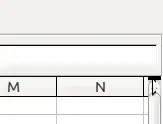
  1. Drag the little black horizontal segment that is above the scroll bar, while dragging you will see an horizontal line moving;
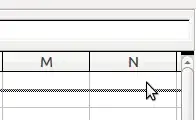
  2. Drop the line just under the selection you want to maintain fixed.

Drag:

drag

and drop:

drop

Using menus:

  1. Select the row below the line where you want the split to appear;
  2. Select Window > Split

How to freeze the spreadsheet

  1. Select the row below the row you want to freeze;
  2. Select Window > Freeze
neydroydrec
  • 3,777
  • 8
  • 32
  • 42
enzotib
  • 50,671
  • 14
  • 120
  • 105