I like to have the output of ls colored so I quickly can spot files of specific types, however I have a separate disk in my computer which uses a ntfs-3g filesystem, this means that everything has rwxrwxrwx.
Here is the output of ls -l -a in a sample directory with a few files.
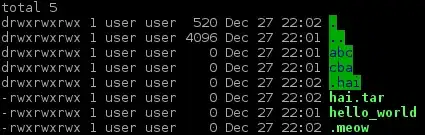
As you can see everything is green and blocky and especially the directories look out of place.
I would like for a way to either have coloring from file attributes disabled on ntfs-3g or completely disable coloring on ntfs-3g filesystems.
The difficult part of this is to localize these colorization changes to ntfs-3g file systems.
If it's not possible to localize to ntfs-3g filesystems directly, it would be fine for me to manually specify the path to the mount points.
Entry in for the ntfs filesystem in /etc/fstab
/dev/sdb1 /media/DATA ntfs-3g rw,users,noauto,uid=1000,gid=1000 0 0
I'm running debian sid.


