In a CentOS 7 server, I get the following error when I type sudo apachectl restart after I add an include file at the bottom of httpd.conf:
Job for httpd.service failed. See 'systemctl status httpd.service' and 'journalctl -xn' for details.
When I then type sudo systemctl status httpd.service -l, the result is:
httpd.service - The Apache HTTP Server
   Loaded: loaded (/usr/lib/systemd/system/httpd.service; enabled)
   Active: failed (Result: exit-code) since Tue 2014-12-23 20:10:37 EST; 2min 15s ago
  Process: 2101 ExecStop=/bin/kill -WINCH ${MAINPID} (code=exited, status=0/SUCCESS)
  Process: 2099 ExecStart=/usr/sbin/httpd $OPTIONS -DFOREGROUND (code=exited, status=1/FAILURE)
 Main PID: 2099 (code=exited, status=1/FAILURE)
   Status: "Total requests: 0; Current requests/sec: 0; Current traffic:   0 B/sec"

Dec 23 20:10:37 ip-address httpd[2099]: AH00558: httpd: Could not reliably determine the server's fully qualified domain name, using fe80::e23f:49ff:feb7:2a21. Set the 'ServerName' directive globally to suppress this message
Dec 23 20:10:37 ip-address systemd[1]: httpd.service: main process exited, code=exited, status=1/FAILURE
Dec 23 20:10:37 ip-address systemd[1]: Failed to start The Apache HTTP Server.
Dec 23 20:10:37 ip-address systemd[1]: Unit httpd.service entered failed state.
I can get apache to restart if I comment out the include directive, and I can recreate the error again by un-commenting the include directive. How can I get apache to start properly using the contents of the include file?
The line at the bottom of httpd.conf that triggers the error is: IncludeOptional sites-enabled/*.conf. The only .conf file in the sites-enabled folder is mydomain.com.conf, which has the following contents:
<VirtualHost *:80>
    ServerName www.mydomain.com
    ServerAlias mydomain.com
    DocumentRoot /var/www/mydomain.com/public_html
    ErrorLog /var/www/mydomain.com/error.log
    CustomLog /var/www/mydomain.com/requests.log combined
</VirtualHost>
The httpd.conf is the same as what comes pre-installed with httpd, except for the one line include directive above. I know because I did sudo yum remove httpd mod_ssl and sudo yum install httpd mod_ssl right before triggering this error. The entire httpd.conf can be read at a file sharing site by clicking on this link.
I encountered this problem when explicitly following the steps in this tutorial.
When I comment out the include file, http/mydomain.com successfully serves up the static content located in /var/www/html, which is the DocumentRoot defined in httpd.conf. The problem seems to be coming from the VirtualHost directive in the include file shown above. To aid in diagnosis, I have included in EDIT#3 below links to all of the .conf files that are contained in the three include directives in httpd.conf.
EDIT #1
When I try m32's advice to change the /etc/hostname to define mydomain.com, apache still will not restart, and the systemctl status httpd.service results in the following:
[sudo_user_account@server-ip-address ~]$ sudo systemctl status httpd.service -l
httpd.service - The Apache HTTP Server
   Loaded: loaded (/usr/lib/systemd/system/httpd.service; enabled)
   Active: failed (Result: exit-code) since Tue 2014-12-23 14:25:35 EST; 20s ago
  Process: 31993 ExecStop=/bin/kill -WINCH ${MAINPID} (code=exited, status=0/SUCCESS)
  Process: 31991 ExecStart=/usr/sbin/httpd $OPTIONS -DFOREGROUND (code=exited, status=1/FAILURE)
 Main PID: 31991 (code=exited, status=1/FAILURE)
   Status: "Total requests: 1; Current requests/sec: 0; Current traffic:   0 B/sec"

Dec 23 14:25:35 hostname systemd[1]: httpd.service: main process exited, code=exited, status=1/FAILURE
Dec 23 14:25:35 hostname systemd[1]: Failed to start The Apache HTTP Server.
Dec 23 14:25:35 hostname systemd[1]: Unit httpd.service entered failed state.
EDIT #2
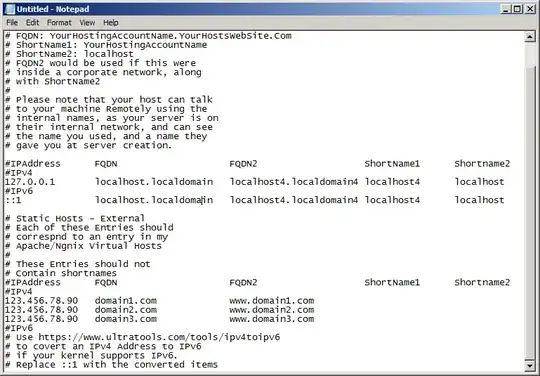
I also tried eyoung100's advice to change the contents of my /etc/hosts file, as defined in the following image, but I still get the same error defined in EDIT#1 above.
EDIT#3
Per DerekC's request, I ran sudo apachectl configtest and got:
AH00558: httpd: Could not reliably determine the server's fully qualified domain name, using fe80::e23f:49ff:feb7:2a21. Set the 'ServerName' directive globally to suppress this message
Syntax OK
In addition, per GarethTheRed's suggestion, I examined the include directives in httpd.conf. There are three include directives in httpd.conf. I have listed the three below, along with all the files located in each directive's folder. These are all the standard .conf files installed with httpd. I have not modified any of them yet. You can view each of the .conf files at a file sharing site by clicking on the links below:
Include conf.modules.d/*.conf references the following files in the conf.modules.d directory:
00-base.conf
00-dav.conf
00-lua.conf
00-mpm.conf
00-proxy.conf
00-ssl.conf
00-systemd.conf
01-cgi.conf
IncludeOptional conf.d/*.conf references the following files in the conf.d directory:
autoindex.conf
ssl.conf
userdir.conf
welcome.conf
There is also a README file that I am omitting here.
In addition, the IncludeOptional sites-enabled/*.conf directive and it's contents were outlined thoroughly in the OP above.
Are any of these include files conflicting with the VirtualHost settings in mydomain.com.conf?
EDIT#4
Per garethTheRed's suggestion, I moved mydomain.com.conf to the conf.d directory and then started commenting out lines in mydomain.com.conf one by one until httpd was able to restart. I then started un-commenting lines to see how many lines could remain and have httpd still restart. I was able to get httpd to restart, but systemctl status httpd.service -l continues to produce the same warning:
AH00558: httpd: Could not reliably determine the server's fully qualified domain name, using fe80::e23f:49ff:feb7:2a21. Set the 'ServerName' directive globally to suppress this message
The VirtualHost syntax that allows httpd to start (though continuing to generate the above warning) is as follows:
<VirtualHost *:80>
    ServerName www.mydomain.com
    ServerAlias mydomain.com
    DocumentRoot /var/www/mydomain.com/public_html
</VirtualHost>
Note that I had to omit the following lines, whose presence escalates the warning into a complete inability to start http:
# ErrorLog /var/www/mydomain.com/error.log
# CustomLog /var/www/mydomain.com/requests.log combined
Also, I ran sudo journalctl -xelu httpd and the terminal replied by repeating the following many times:
--
-- Unit httpd.service has finished shutting down.
Dec 24 17:48:43 server-ip-address systemd[1]: Stopped The Apache HTTP Server.
-- Subject: Unit httpd.service has finished shutting down
-- Defined-By: systemd
-- Support: http://lists.freedesktop.org/mailman/listinfo/systemd-devel
--
-- Unit httpd.service has finished shutting down.
Dec 24 17:48:48 server-ip-address systemd[1]: Starting The Apache HTTP Server...
-- Subject: Unit httpd.service has begun with start-up
-- Defined-By: systemd
-- Support: http://lists.freedesktop.org/mailman/listinfo/systemd-devel
--
-- Unit httpd.service has begun starting up.
Dec 24 17:48:48 server-ip-address httpd[10364]: AH00558: httpd: Could not reliably d
Dec 24 17:48:48 server-ip-address systemd[1]: Started The Apache HTTP Server.
-- Subject: Unit httpd.service has finished start-up
-- Defined-By: systemd
-- Support: http://lists.freedesktop.org/mailman/listinfo/systemd-devel
--
-- Unit httpd.service has finished starting up.
--
-- The start-up result is done.
lines 887-909/909 (END)
Note: The above results remain the same regardless of whether I use eyoung100's hosts file or m32's host file. For this question to be answered, I think I should be able to create log files and also avoid the servername warning. Otherwise, I fear that subsequent steps of configuring httpd will be prone to lingering errors.


