4

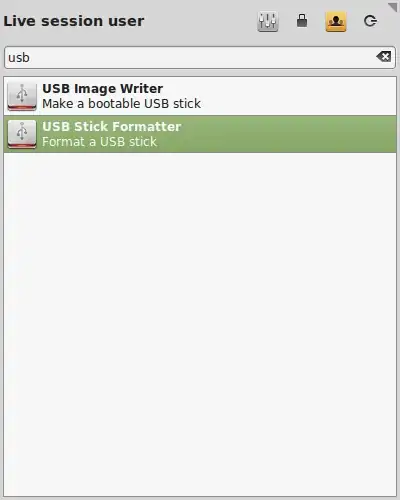
In Linux Mint, unlike in Ubuntu, I see two separate launchers to handle USB sticks, one only for formatting, the other for writing image files to the USB stick.

enter image description here

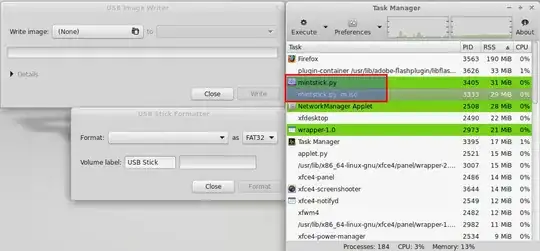
In the task manager I see in fact that they are both running mintstick.py with supplementary parameters for handling the iso.

enter image description here

Is this related to usb-creator-gtk (Startup Disk Creator) from Ubuntu?

Can it be used in other Linux systems?

1 Answers1

5

It's Mint's alternative to usb creator. It is a graphical application to write .img and .iso files to USB keys. It can also format USB Key from a contextual menu in Cinammon and KDE desktops. It can be used in other linux systems, at least in Ubuntu for sure.

sudo add-apt-repository ppa:tsvetko.tsvetkov/trusty-backports
sudo apt-get update
sudo apt-get install mintstick

UPDATE: that ppa is not updated and will not work in latest Ubuntu 18.04

For Ubuntu 18.04, until a newer version is launched along with a Ubuntu 18.04-based Linux Mint, download latest version 1.3.8 from here.

Open a terminal at the location of the download and do

sudo dpkg -i mintstick_1.3.8_all.deb

Install the missing dependencies.

If needed do

sudo apt --fix-broken install

then do again sudo dpkg -i mintstick_1.3.8_all.deb.

Actually mintstick is an improved version of USB-ImageWriter, which is based on dd utility and came from OpenSUSE and can work with any distro image. But Startup Disk Creator (usb-creator) is made for ubuntu and ubuntu-based systems only. It also has optional persistence option (all changes made to the system are saved, unlike a Live CD) which minstick doesn't have.

Installing mintstick, you will then have both the Image Writer and the USB Formatter.

enter image description here

kirill-a
  • 2,883
  • 1
  • 16
  • 22
  • what program is that exactly and is it different from the Ubuntu default one, or just a different GUI of the same program? and how to install it? –  Dec 10 '14 at 07:30
  • 1
    it's different. You can find sources to compile [on github](https://github.com/linuxmint/mintstick) or if you're using ubuntu you can add mint repo: `sudo sh -c 'echo "deb http://packages.linuxmint.com/ olivia main" >> /etc/apt/sources.list'` `sudo apt-get update` `sudo apt-get install linuxmint-keyring` `sudo apt-get install mintstick` – kirill-a Dec 10 '14 at 07:34
  • I have found more about what it is in fact [here](http://linuxg.net/how-to-install-mintstick-1-2-1-on-ubuntu-14-04-pinguy-os-14-04-deepin-2014-lxle-14-04-and-other-ubuntu-14-04-derivatives/) and can be installed from a separate PPA as indicated there. It's the DD Tool. - The Ubuntu one is different then. What is it then? Elaborate a bit your answer is far too short. –  Dec 10 '14 at 07:40
  • 1
    Actually mintstick is an improved version of USB-ImageWriter, which is based on dd utility and came from OpenSUSE and can work with any distro image. But Startup Disk Creator (usb-creator) is made for ubuntu and ubuntu-based systems only. It also has optional persistence option (all changes made to the system are saved, unlike a Live CD) which minstick doesn't have. – kirill-a Dec 10 '14 at 08:21
  • added what you said and what i found into your answer to set it definitive, hope the edit is accepted –  Dec 10 '14 at 08:44
  • I cannot find a mintstick package in relation to opensuse lately. But I have added a method that works in Ubuntu 18.04. –  Jun 25 '18 at 16:32
  • this tool can also format to exFAT, which is greatly suited when it comes to USB sticks (namely with regard to speed and cross-platform access): https://askubuntu.com/a/1214554/925128 – cipricus Mar 04 '20 at 15:13