1

I have trouble, while booting up a linux machine of mine.

During the boot phase, while running the /init script it complains about not being able to find mount. My PATH variable is set to /sbin and /bin.

I tried calling /bin/mount directly, which also failed, saying it doesn't exist.

Then I included find ., which was found and showed that /bin/mount was actually accessible.

I'm not sure what to make of this. I read, that initramfs is basically a busybox shell, so could the problem lie there?

UPDATE

It seems like mount is the only command/file that does not get found. I started sh during the boot process; it tab completed mount and found it via find.

When I tried to execute it, however, I get the same "not found" error message as shown below.

UPDATE 2

I solved the problem temporarily by replacing every instance of mount in my /init with /bin/busybox mount. It works that way.
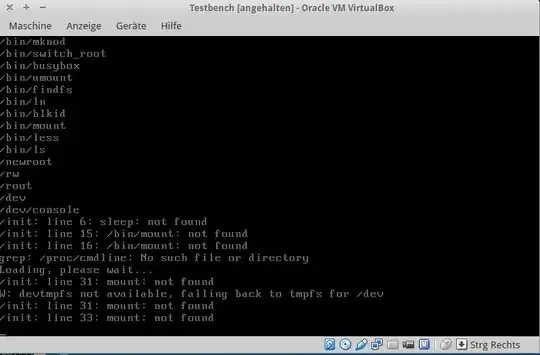
Paused VM

Minix
  • 5,735
  • 8
  • 28
  • 45

2 Answers2

0

You have saved the script in DOS (windows) mode, meaning there is an extraneous return character at the end of each line.

Easiest way to fix that is probably to load the file in vim, change the mode with :set notx and then save the file, e.g. :wq.

wurtel
  • 15,835
  • 1
  • 29
  • 35
  • Will test right away. – Minix Nov 24 '14 at 10:29
  • Unfortunately this did not solve the problem. – Minix Nov 24 '14 at 10:38
  • Weird. I assume you've already checked that `/bin/mount` has execute permission. – PM 2Ring Nov 24 '14 at 12:47
  • It had the sticky bit, but even after changing it, the shell wouldn't find it. But yes, I checked already. – Minix Nov 24 '14 at 12:48
  • I don't think the error message is consistent with spurious CR: `/bin/mount` would be called with arguments, so it's the last argument and not the command name that would have a CR at the end. Furthermore, the message would appear to be `: not found 15: /bin/mount` due to the CR in the message. – Gilles 'SO- stop being evil' Nov 24 '14 at 22:19
0

It's possible that /bin/mount is a broken symbolic link. It would be found by find ., because that displays all directory entries, but if you try to run that program, it won't work since there's no file at the end of the rainbow. The BusyBox applet names would normally be links to the BusyBox executable: mount -> busybox or mount -> /bin/busybox (if busybox is in /bin).

Another possibility is that the mount binary is the one from your live system. That binary is a dynamically linked library that uses the dynamic loader, which may not be present in the initramfs. See Getting "Not found" message when running a 32-bit binary on a 64-bit system for an explanation of a similar case.

Gilles 'SO- stop being evil'
  • 807,993
  • 194
  • 1,674
  • 2,175
  • I checked before, that `mount` is a file and not just a link. I'm not sure what you mean with live system. The one virtual box is running in, or the one from rootfs? I will look at the link, thanks for your time. – Minix Nov 24 '14 at 23:51
  • @Minix Live system where it was copied from into the initramfs. – Gilles 'SO- stop being evil' Nov 24 '14 at 23:59