I installed Linux Mint 17 Cinnamon over Windows 8 recently on an Acer Aspire E1-570.
http://www.acer.com.au/ac/en/AU/content/model/NX.MEPSA.004
Everything seems to be working fine, however I notice that my fan seems to be on at high speed a lot of the time.
Can someone please tell me definitive troubleshooting steps that are relevant to this distro.
Also if there are commands that I can run to get the relevant system information required to troubleshoot the issue it would be great to know these too.
Edit
In case it is relevant, the screen brightness applet control wasn't working so I followed steps below - perhaps that altered something?
me@computer ~ $ ls /sys/class/backlight/
acpi_video0  intel_backlight
sudo touch /usr/share/X11/xorg.conf.d/20-intel.conf
sudo gedit /usr/share/X11/xorg.conf.d/20-intel.conf

and then added this to the file:

Section "Device"
Identifier  "card0"
Driver      "intel"
Option      "Backlight"  "intel_backlight"
BusID       "PCI:0:2:0"EndSection
http://itsfoss.com/fix-brightness-ubuntu-1310/
Sensors also seems to be mentioned in other posts so I typed it into the command and this was the output:
me@computer ~ $ sensors
coretemp-isa-0000
Adapter: ISA adapter
Physical id 0:  +44.0°C  (high = +87.0°C, crit = +105.0°C)
Core 0:         +44.0°C  (high = +87.0°C, crit = +105.0°C)
Core 1:         +44.0°C  (high = +87.0°C, crit = +105.0°C)
More System Information
me@computer ~ $ cat /sys/devices/system/cpu/cpu0/cpufreq/scaling_governor
ondemand

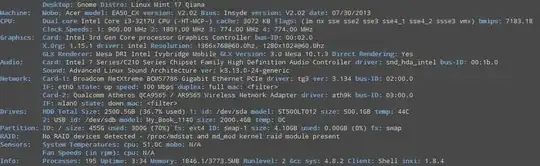
me@computer ~ $ inxi -Fxz
System:    Host: computer Kernel: 3.13.0-24-generic x86_64 (64 bit, gcc: 4.8.2)
 Right-click > "Open image in new tab" to see image at full size.


