Are there any image viewers which will auto reload the view when the image file is written to?
I normally use debian variations of linux however appreciate all answers related to any "Unix & Linux" environments.
Are there any image viewers which will auto reload the view when the image file is written to?
I normally use debian variations of linux however appreciate all answers related to any "Unix & Linux" environments.


The old Gnome image viewer Eye of Gnome seems to automatically reload the image when it is edit in a program such as Gimp. There is also a reload plugin so to you can use a button to reload the image:
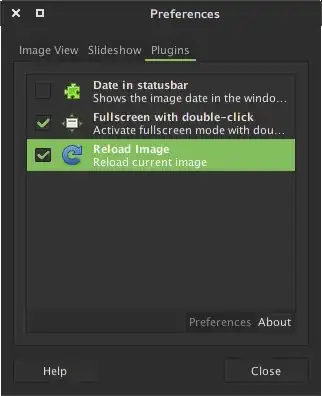
Works in version 3.8.2

feh can reload a file on a periodic timer.
An example of the command: feh --reload 0.1 picture.png.
It reloads without being the active window, which is really nice.
To make it look "hacker" use -x.
Solution found in http://forums.fedoraforum.org/showthread.php?t=255652.


KDE's okular does that (at least with PDFs which are completely replaced).

For Linux systems, eog (eye of gnome) and eom (eye of mate) both ask you if you want to refresh if the image is changed.
The evince PDF viewer updates automatically if the PDF is changed.

The --watch/-T option enables reloading in qiv.

If you're on OSX, Xee3 automatically reloads on file changes.

https://gitlab.com/dknof/siv does what you want.
Here's how I built it:
$ sudo apt-get install clang libgtkmm-3.0-dev ccache
...output omitted...
$ mkdir ~/src; cd ~/src
$ git clone https://gitlab.com/dknof/siv.git
...output omitted...
$ cd siv/src
$ make
And here's how I use it:
$ pwd
~/src/siv/src
$ ./siv ~/docs/my_image.png
Then, whenever I write to ~/docs/my_image.png, siv automatically re-loads the image immediately.
I got this answer from here: https://askubuntu.com/a/783622/177787

geeqie
Nobody has mentioned geeqie? This is my goto image viewer and is very powerful and fast and it will auto reload the image upon file change.

Preview.app does what you want. (If you click on the desktop, and the back, the image is refreshed.)

Sublime text also allows you to do this. Just open the image and it will auto-refresh without any additional settings.

On MS Windows, JPEGView does auto-refresh of images (useful for instance with PlantUML). Download here: https://github.com/sylikc/jpegview or with PortableApps.

