3

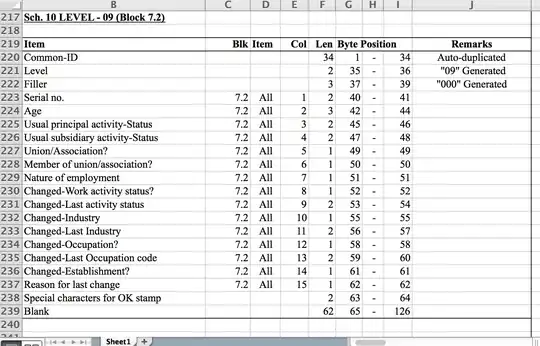
I've got an Excel file, shown in the picture below, and available for download here. What I need is to extract the variables under Item (Column B) and the values in column G. As a start, I tried saving the Excel file as a comma-delimited .csv file, but when I check the number of rows in the Mac OS X Terminal, it tells me that the CSV file is just one row:

$ wc -l Layout.csv
0 Layout.csv

Any idea for why this might be the case?

Excel file

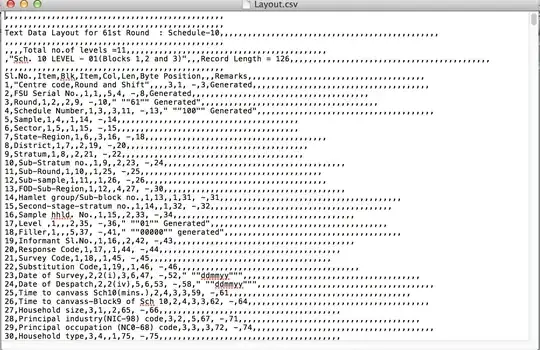
Here is the CSV file opened in a text editor, showing that it has multiple lines:

csv version of file

You can download that file here.

terdon
  • 234,489
  • 66
  • 447
  • 667
PollPenn
  • 135
  • 1
  • 4

1 Answers1

6

After seeing your CSV output, the problem is clear: you told Excel to use CR line endings, probably because it informed you that they are "Macintosh" style. That is badly outdated information, not true for over a decade now.

There are three main line ending styles:

  1. LF: The style used by Unix and all its primary derivatives, including Mac OS X.

  2. CR: The style chosen by "classic" Mac OS, abandoned by Apple in 2001 with the move to Mac OS X. Since classic Mac OS is the only popular OS to ever use this style, it is almost never seen any more in practice. The CSV file you have linked to is one of these rare examples.

  3. CR+LF: The DOS/Windows style of line ending. Technically, this style is truer to the history of ASCII, and therefore "more correct," but it is uncommon to see outside of the Microsoft world.

The best way to fix this is to get Excel to use LF line endings, that being the native form for OS X, which will make wc and other command line Unix tools happy. But, that is outside the scope of this forum. (Try Super User if you really can't work it out on your own.)

An on-topic Unix command line way to fix it is:

$ tr '\r' '\n' < Layout.csv > Layout-LF.csv

(This is one of those sorts of problems that has about as many different solutions as there are people offering them.)
Warren Young
  • 71,107
  • 16
  • 178
  • 168
  • This is great. Thank you so much for this. I must have spent nearly 3 hours trying to figure this out. – PollPenn Oct 12 '14 at 04:02
  • an easy way to see which line endings a file uses is to use `file` utility on it. It reports *"... text, with CR line terminators"* for old-macos style files. (For dos-style files it reports *"... CRLF line terminators"*, and for unix it doesn't mention line terminators at all). – artm Oct 12 '14 at 06:30
  • 1
    @artm: That's specific to the version of `file(1)` you are using. The version shipped with Mac OS X doesn't do that. FWIW, I determined the CSV file's line ending style by opening it in `vi`, which showed `^M` characters where the lines ended, since `vi` assumes LF line ending. – Warren Young Oct 12 '14 at 06:39
  • Worth mentioning that you can `cat -v` the file to see the non-visible `^M` characters – c.gutierrez Mar 24 '15 at 02:06