9

I uninstalled my wine, and installed a higher version of wine by compiling source.

However when I run an exe executable (whose path is in $PATH), it doesn't work as it used to:

$  PDFXCview.exe   

run-detectors: unable to find an interpreter for /home/tim/program_files/document/pdfxchange_portable/PDFXCview.exe

I am not sure why I was able to run this executable directly before I uninstalled my old wine and installed the new one. How can I make $ PDFXCview.exe work now?

Note:

$ wine /home/tim/program_files/document/pdfxchange_portable/PDFXCview.exe

will work.

$ wine PDFXCview.exe 

wine: cannot find L"C:\\windows\\system32\\PDFXCview.exe"

doesn't work. Note that the path of PDFXCview.exe is still in $PATH

Thanks.

Tim
  • 98,580
  • 191
  • 570
  • 977

4 Answers4

9

I uninstalled my wine, and installed a higher version of wine by compiling source. However when I run an exe executable (whose path is in $PATH), it doesn't work as it used to.

As you have obviously seen the following works correctly

wine file.exe

but the following does not

# for a file in the current directory
./file.exe              

# for a file that is included your path             
file.exe

My version of wine is v1.8.3 from debian/jessie-backports and
should be valid back to, at least, v1.6.2 (which is the default in debian/jessie).

You must do the following:

sudo apt-get install wine-binfmt
sudo update-binfmts --import /usr/share/binfmts/wine

Now you should be able to execute the binary file as shown above,
without having to call it using wine.

The exe file must also be marked as executable:

chmod a+x file.exe
roaima
  • 107,089
  • 14
  • 139
  • 261
NeoH4x0r
  • 201
  • 2
  • 2
8

Linux has a mechanism that allows plug-ins to be registered so that the kernel calls an interpreter program when instructed to execute a file: binfmt_misc. See How does chroot's use of qemu for cross compile environments work? for a more detailed overview.

Your Wine package registered /usr/bin/wine as an interpreter for Windows executables as part of its installation script or via a startup script contained in the package. You can do the same for your home-built wine. Some distributions have a mechanism where packages can register interpreters which will then be registered into the kernel at boot time, for example update-binfmts on Debian and derivatives. Alternatively, an interpreter can be registered into the kernel during startup by writing to /proc/sys/fs/binfmt_misc/register. I recommend that you look at the package you used to have and adapt the method that was working before.

Gilles 'SO- stop being evil'
  • 807,993
  • 194
  • 1,674
  • 2,175
  • Thanks. Later I found that I had some remaining files from my old wine, so I apt-get purge the old wine, but that also installed something for the new wine. After that, I can run a Windows executable directly. Not sure why. – Tim Oct 04 '14 at 20:35
  • This has nothing to do with binfmt_misc, it has been correctly triggered with `run-detectors`. It's just `run-detectors` has some bug or simply by-design can't detected installed wine program because of those old files. @Tim – 炸鱼薯条德里克 Feb 03 '19 at 03:45
0

It should be caused by the conflict with systemd.

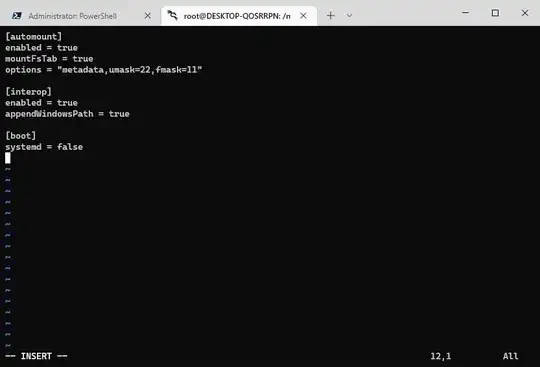
Please check the file /etc/wsl.conf and see if the systemd = true flag was added under [boot] settings as shown below. If so, please switch it to false.

Snipaste_2023-01-12_11-45-09

For more info, please refer to https://learn.microsoft.com/en-us/windows/wsl/wsl-config#per-distribution-configuration-options-with-wslconf

J1NX
  • 1
  • 2
    The question is not about wsl (also this one was asked in 2014). Also I don't understand how systemd can cause conflicts to wine. Did you have the same problem and did you solve it by disabling systemd? – Edgar Magallon Jan 12 '23 at 05:38
  • We were having different problems. Maybe you can have a try. Good luck! – J1NX Jan 12 '23 at 12:59
-1

Okay, listen carefully. This is what you do.

Place this in /usr/bin/pdfxcview.exe

#!/bin/bash
# Call up a command;
wine /home/tim/program_files/document/pdfxchange_portable/PDFXCview.exe

Then, invoke from Terminal:

$ chmod +x /usr/bin/pdfxcview.exe

^ Sets executable bit to on.

$ pdfxcview.exe

Source Code Differential

Isn't Freedom of Software Great? It seems there is commentary about path. If you print your environment by typing "env" you may see your Program Files directory.

Launchpad Librarian is where Ubuntu Developers keep documentation about their work keeping your system up to date and secure.

Tyler Maginnis
  • 1,425
  • 11
  • 12
  • 3
    thanks. I understand your method. But when i still had my old wine, I didn't do what you suggested. I did `chmod a+x /home/tim/program_files/document/pdfxchange_portable/PDFXCview.exe`, and added `/home/tim/program_files/document/pdfxchange_portable/` to `$PATH` in ~/.bashrc. Then `$ pdfxcview.exe` worked. – Tim Oct 04 '14 at 01:20
  • It's a better practice, my friend, to place "wrapper" scripts to your executable files in your /usr/bin/ directory. It keeps things more organized. It's really a matter of personal preference. Within /usr/bin/, these "wrappers" are accessible from any user. However, ~/.bashrc will only be accessible from your own user's environment exports. The "env" command lists environment variables. – Tyler Maginnis Oct 04 '14 at 01:21
  • yes, I think it is a universal method. thanks. Not sure why it worked before without your method. – Tim Oct 04 '14 at 01:27
  • What version of WINE did you use before..? Perhaps I can investigate the Source code to discover if it dynamically generated a $PATH to your WINE environment. I know that WINE actually creates a File System to not-emulate Windows Executable. – Tyler Maginnis Oct 04 '14 at 01:29
  • My old is wine1.6 1:1.6.1-0ubuntu1~ppa1~precise1. My new is wine1.6.2 compiled from source. – Tim Oct 04 '14 at 01:30
  • 1
    [https://launchpadlibrarian.net/160159615/wine1.6_1.7.1-actually1.6-0ubuntu1_1%3A1.6.1-0ubuntu1~ppa1~precise1.diff.gz] There seems to be commentary about paths for executable. Then again, if you print your environment with, "env," you may see a path that Wine added for your Program Files directory. Isn't Freedom of Software great, being able to see a document that can tell you what broke and what not broke in this release? – Tyler Maginnis Oct 04 '14 at 01:36
  • in the output of `env`, no path of wine, only path of PDFXCview.exe – Tim Oct 04 '14 at 01:39
  • What is launchpadlibrarian.net used for? – Tim Oct 04 '14 at 01:43