I like the image-preview in ranger, but I also like my terminal transparent.
Is there really no way to get the image-preview work with w3m and transparent background? (I'm willing to change my terminal-emulator if that's necessary, currently urxvt)
Not sure what terminal you're using but if it's using a bit-depth of 32 or higher then it won't work.
excerpt - Images in terminalSide note: w3m can't render images in urxvt, if the depth is 32. That means that you can't render images on a transparent background. Be sure that you comment the line URxvt*depth: 32 in your ~/.Xresources.
This thread also discussed it as well: - w3m/ranger images don't work on urxvt.
excerptIt doesn't work with transparent terminals. I always make a shortcut for a "special ranger terminal" that has transparency disabled.

I have a transparent terminal that works with ranger's image preview. I use termite (terminal emulator) and compton (compositor) for transparency (a nice combo when you use i3wm).
Here's the result:
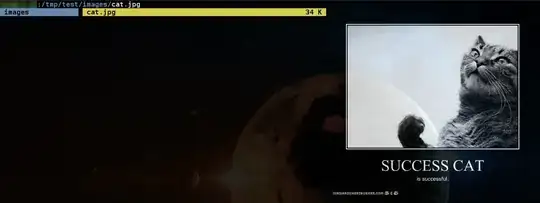
The only problems I had were with tmux (images are displayed, but not always at the right position and sometimes the terminal needs to be refreshed).
Note that the text and the image are also transparent since transparency is handled by compton. This only works if you don't add too much transparency, else you need a terminal emulator that handles transparency and works with this feature (I tried with terminator and I did not work for instance, same for urxvt). 85% opacity gives me some transparency and good readability, so this setup works for me.
True transparency is supported once again in termite, but it suffers from the same issues as urxvt when you enable transparency (failed to execute w3mimgdisplay error, cf. @slm's answer).

