5

Using some of node.js tools like mocha in my urxvt terminal, I have some problems with coloured output. Some of the text that are using colour code 90 as you can see here will be disappeared in terminal.

tput colors output is: 256

And using this command:

(x=`tput op` y=`printf %76s`;for i in {0..256};do o=00$i;echo -e ${o:${#o}-3:3} `tput setaf $i;tput setab $i`${y// /=}(x=`tput op` y=`printf %76s`;for i in {0..256};do o=00$i;echo -e ${o:${#o}-3:3} `tput setaf $i;tput setab $i`${y// /=}$x;done)$x;done)

It seems I have all available colours.

But when I try to echo something like this:

echo '\e[0;90m shahin \e[m '

There will be a just an empty line printed! Is there anyway to define this colour code manually?

Thank you all!

Update: I think some images will describe the situation much better. Here is an image of echo command in finalterm terminal:

enter image description here

And here I put the result from urxvt:

enter image description here

And here is the result of this perl script that is running on the same urxvt:
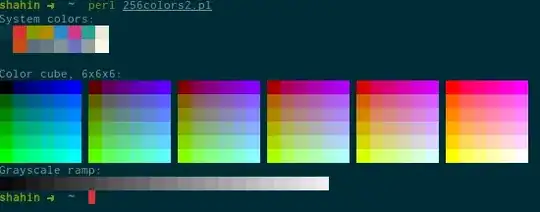
enter image description here

Shahin
  • 224
  • 2
  • 6

2 Answers2

1

You are using the wrong escape sequence.

It's close (begins with escape[, ends with m), but the wrong parameters.

There are at least three SGR (select graphic rendition) escape sequences which are used to print colors in xterm and similar terminals:

  • ANSI (colors 0-7), which use parameters 30-37 (foreground) and 40-47 (background)
  • aixterm (colors 8-15), which use parameters 90-97 (foreground) and 100-107 (background)
  • 256colors (colors 0-255), which use codes 38;5;parameter (foreground) and 48;5;parameter (background)

So you've selected the aixterm foreground color 8. By convention, those are shown as brighter versions of colors 0-7. ANSI color 0 is black. Bright black is... depending on the terminal, it could be gray. It could be just black.

Perhaps you meant something like this:

echo '\e[0;38;5;90m shahin \e[m '

although this is portable:

printf '\033[0;38;5;90m shahin \033[m \n'

Further reading:

Thomas Dickey
  • 75,040
  • 9
  • 171
  • 268
0

The problem is not that the color is not visible,
it is just the same as the terminal background, dark gray for example.

The there is a color that is essentially transparent, showing the terminal default color underneath. But it is not shure this color is in use - it may be just that the "black" color used for background is actually the same dark gray as you use for foreground.

If possible, open a teminal that allows to experiment with colors settings easily with a gui, like konsole or gnome-terminal, and clearly shows what you can change. Or just experiment in rxvt-unicode if it is suitable.

I think you will at least have some clue what is wrong, if not a solution.

If it's not solved then, present your new information here, and let's work the details out.


Sidenote:

I did not get your long command to work by copy and paste, but it may be similar to
colortest-256

from the package colortest on Ubuntu etc.

Try colortest-16 too, it may help to explain your problem.
If not, post a screenshot!

Volker Siegel
  • 16,983
  • 5
  • 52
  • 79
  • I added some images to the question. There is also an example of another terminal emulator that shows the colour without problem. The little script you mentioned I found somewhere on the internet that I can't find the source now. But there is an example of a perl script that I added a image of the result up there too. – Shahin Aug 12 '14 at 15:13