12

I am using vim 7.2 from putty terminal.
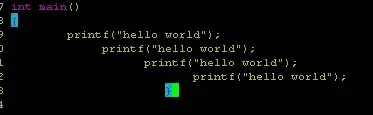
Even if I run set noai it seems vim still trying to indent code. I am copying my code from Notepad++ to vim. following is from Notepad++
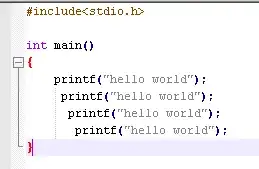
alt text

and following what I got in vim:
alt text

I don't have any tab in my file.
As a workaround I am opening old vi run set noai paste save and open in vim again. Any suggestion how to correct this behavior ?

slm
  • 363,520
  • 117
  • 767
  • 871
Hemant
  • 6,834
  • 5
  • 38
  • 42
  • why negative vote? – Hemant Sep 01 '10 at 13:59
  • Probably because your question is not strictly Unix related. VIM runs just about any platform known to mankind. – wzzrd Sep 01 '10 at 14:24
  • @wzzrd: I thought its something to do with putty and unix terminal. – Hemant Sep 01 '10 at 16:46
  • 1
    @wzzrd, really? I mean, there are a lot of unix related tools that run on non-unix systems as well. Including Windows versions of sed/grep for example ... And besides, what would be a better stackexchange site for vim questions? – maxschlepzig Sep 01 '10 at 17:30
  • 1
    Guys, guys, guys: I did not downvote this question. I am merely guessing what *might* be the reason for the downvote. As a matter of fact: I just upvoted it :) – wzzrd Sep 01 '10 at 18:56

2 Answers2

9

This has nothing to do with the noai option. What you are experiencing, is a little trouble copy-pasting a load of text with existing indents to vim.

What I usually do (I have this 'problem' a lot), is bind F4 to invpaste and then, before I paste stuff into vim, hit that key. It makes the problem go away.

nnoremap <F4> :set invpaste paste?<CR>

Read more about this using

:help paste 

inside vim

wzzrd
  • 3,690
  • 24
  • 19
3

:set paste prevents the problem

:set nopaste to undo the above

:set pastetoggle=<F2> sets paste toggle key to F2

Roger Mungo
  • 325
  • 1
  • 4
  • 13