12

When I run several jobs on a head node, I like to monitor the progress using the command top.

However, when I'm using PBS to run several jobs on a cluster, top will of course not show these jobs, and I have resorted to using 'qstat'. However the qstat command needs to be run repeatedly in order to continue monitoring the jobs. top updates in real-time, which means I can have the terminal window open on the side and glance at it occasionally while doing other work.

Is there a way to monitor in real-time (as the top command would do) the jobs on a cluster that I've submitted using the PBS command qsub?

I was surprised to see so little, after extensive searching on Google.

Gilles 'SO- stop being evil'
  • 807,993
  • 194
  • 1,674
  • 2,175
Nike Dattani
  • 237
  • 2
  • 14

2 Answers2

17

Why not use watch to update qstat at a regular interval?

watch --interval=0.5 qstat will refresh the terminal with the output of qstat every 0.5 seconds. It doesn't quite satisfy your request of not running qstat repeatedly, but it's not manual at all.

AndyPerfect
  • 271
  • 1
  • 4
  • 1
    Because I wasn't aware of the command. Thank you ;) – Nike Dattani Jul 23 '14 at 13:18
  • Note that not all versions of `watch` will support sub-second intervals. I tested with `watch -v` --> "0.2.0" and `watch -v` --> "watch from procps-ng 3.3.10", and neither supported the value 0.5. – waldyrious Feb 05 '18 at 10:19
5

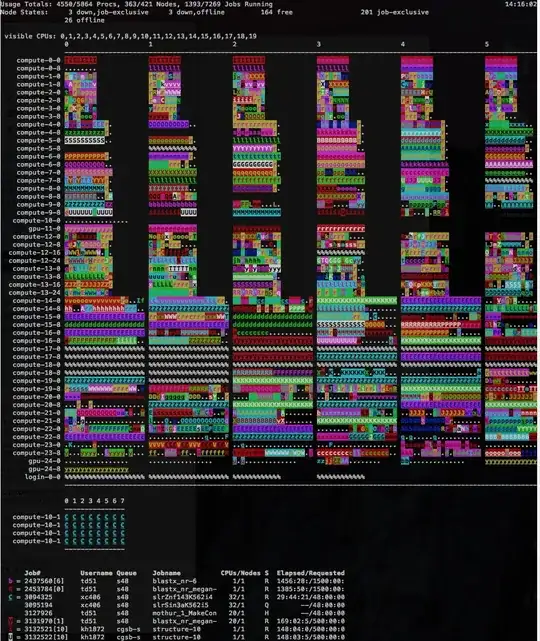
If you want to be a super-boss, you can always use 'pbstop'

It's basically a PBS cluster version of what 'htop' is for local processes.

(Note that your cluster may not have this installed. Ask the admins for it!)

(Also, supports interactive filtering by user, queue, etc)

EG:

enter image description here

dpb
  • 166
  • 1
  • 3
  • 1
    Also, if you haven't used 'htop' for local processes, I'd suggest checking it out. – dpb Feb 18 '15 at 19:18