31

In Gnome Shell, is it possible to change the sequence of workspaces by using drag-and-drop?

For instance, is it possible to make Workspace 2 the uppermost one by dragging it above Workspace 1 (which currently is the uppermost one)?

Please take a look at the image to see what I mean:
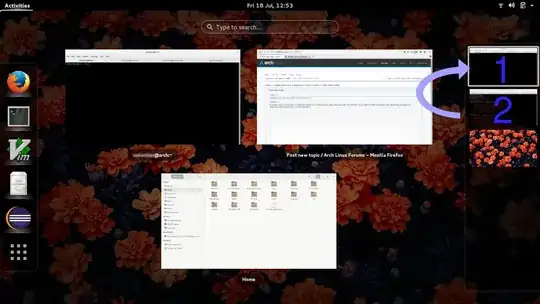
Dragging a workspace

polym
  • 10,672
  • 9
  • 41
  • 65
zepp133
  • 535
  • 4
  • 13
  • in my oldest memory it was on ubuntu 13.10 but maybe not anymore... – Kiwy Jul 18 '14 at 11:25
  • I'd like to do this too. – trusktr Aug 14 '15 at 19:41
  • So, if you had 5 active workspaces, how should this work ? Reverse their order e.g. 5>1...1>5 or rearrange 2>1, 3>2 ... 1>5 ? – don_crissti Aug 20 '15 at 12:23
  • No I don't think it is possible, but you could just move the windows from one workspace to another. However if you were willing to install an extension, I'm sure that there is one for reordering the workspaces. – Harry-Thompson Apr 03 '16 at 12:03
  • [Gnome ticket for this feature](https://bugzilla.gnome.org/show_bug.cgi?id=646409) – olejorgenb Sep 24 '17 at 10:38
  • 1
    @olejorgenb Now on GitLab, [with shortcuts](https://gitlab.gnome.org/GNOME/gnome-shell/-/issues/4023) and [drag and drop](https://gitlab.gnome.org/GNOME/gnome-shell/-/issues/4022) – Pablo A Dec 06 '21 at 07:22

3 Answers3

6

Currently there is no extension that can provide this functionality. But there is one that could help you organize your workspaces if it is compatible with your version of the GNOME shell, "Workspace Grid":

https://extensions.gnome.org/extension/484/workspace-grid/

poinck
  • 156
  • 1
  • 5
6

There is an extension that allows you to reorder workspaces compatible with Gnome 3.38: Reorder Workspaces

https://extensions.gnome.org/extension/3685/reorder-workspaces/

Note that the shortcuts only work on the workspace overview. I've opened an issue to make it possible from the window view: https://github.com/jeremiahmegel/gnome-reorder-workspaces/issues/5

Eric M.
  • 161
  • 1
  • 4
0

It's not a solution, but sometimes when you want to add an extra workspace in front: just create a new window of something on the first workspace and press: Ctrl + Alt + Shift + Arrow Up and it will create a new workspace in front of the sequence.

DenisKolodin
  • 591
  • 4
  • 3