2

I am trying to create a soft hotspot in Linux Mint 17 (based on Ubuntu 14.04 LTS), but when I try I am not able to edit username/password for the created hotpsot moreover it is not detected by my mobile.

Below is the screenshot of Networking window.
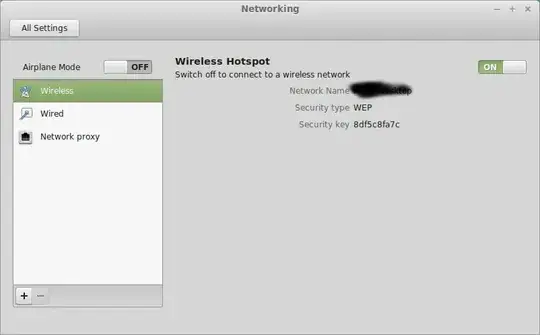
enter image description here

How can I get the options to configure my hotspot?

Or is there any other package available to do it better?

Krishnakumar
  • 121
  • 1
  • 1
  • 3

3 Answers3

2

You can edit the hotspot properties under "Main Menu -> Preferences -> Network Connections".

There should be an entry called Hotspot, which you can edit.

I also changed the "mode=infrastructure" to "mode=ap" under [802-11-wireless] in the /etc/NetworkManager/system-connections/Hotspot file.

Have a look at How to enable Wi-Fi Access point on Mint 17 for more details.

1

I wasn't able to get the graphical tools to respect the ssid change, I was able to find a way to setup a wifi access point directly like so:

nmcli dev wifi hotspot ifname wlp4s0 ssid test password "test1234"

credit: https://unix.stackexchange.com/a/384513/61349

ThorSummoner
  • 4,312
  • 6
  • 30
  • 47
0

Make sure IPv4 settings are shared with other computers.

Open a terminal and type:

sudo vi /etc/NetworkManager/system-connections/YOUR_CONNECTION_NAME

Next change

mode=infrastructure

to

mode=ap 

and save it.

Go to your

network_manager

Choose "connect to hidden"

DnrDevil
  • 241
  • 1
  • 5