29

For a KVM remote console I need to be able to run a jnlp file. When I run it I get:

net.sourceforge.jnlp.LaunchException: Fatal: Initialization Error: Could not initialize application. 
at net.sourceforge.jnlp.Launcher.createApplication(Launcher.java:797)
at net.sourceforge.jnlp.Launcher.launchApplication(Launcher.java:555)
at net.sourceforge.jnlp.Launcher$TgThread.run(Launcher.java:908)
Caused by: net.sourceforge.jnlp.LaunchException: Fatal: Application Error: Cannot grant permissions to unsigned jars. Application requested security permissions, but jars are not signed.
at net.sourceforge.jnlp.runtime.JNLPClassLoader.setSecurity(JNLPClassLoader.java:319)
at net.sourceforge.jnlp.runtime.JNLPClassLoader.<init>(JNLPClassLoader.java:239)
at net.sourceforge.jnlp.runtime.JNLPClassLoader.getInstance(JNLPClassLoader.java:381)
at net.sourceforge.jnlp.runtime.JNLPClassLoader.getInstance(JNLPClassLoader.java:337)
at net.sourceforge.jnlp.Launcher.createApplication(Launcher.java:789)
... 2 more

I understand why you do not want your browser to run arbitrary unsigned code.

But in this situation I do not have a chance to neither change nor sign the code, as it comes from the KVM device.

  • Can I tell Java that this one applet is OK to run unsigned?
    • If not: Can I tell Java running all applets from that domain are OK to run unsigned?
      • If not: Can I tell Java running all applets are OK to run unsigned?
  • Are there better options, given that I cannot change the code?

I am currently using Linux Mint and Chrome.

polym
  • 10,672
  • 9
  • 41
  • 65
Ole Tange
  • 33,591
  • 31
  • 102
  • 198

3 Answers3

20

Allow unsigned JARS

TO:

.java/deployment/deployment.properties

ADD:

deployment.security.level=ALLOW_UNSIGNED

NOTE:

.java/deployment

is an alias to

.config/icedtea-web


Allow weakly signed JARS:

If above doesn't work, try commenting out lines including:

disabledAlgorithms

example

jdk.jar.disabledAlgorithms=MD2, MD5, RSA keySize < 1024

from java.security

/etc/java-*-openjdk/security/java.security

Paul-K
  • 301
  • 2
  • 4
6

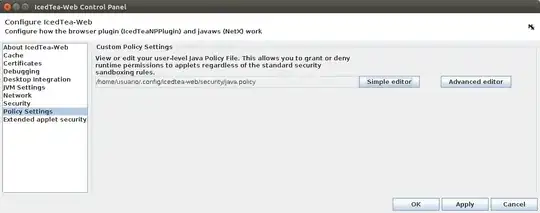
The versions of icedTea included in Ubuntu 14.04 have a new control panel that includes the possibility to configure policies that really work.

The Control Panel now allows to modify the Policy File

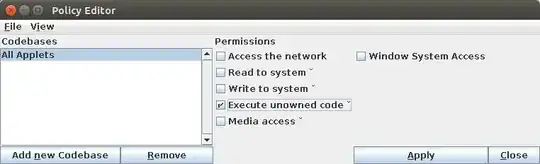
Now you can allow the execution of unowned code. If you are concerned about security, allow that permissions only from the particular CodeBase of you application

Allow the execution of unowned code

I have tried doing the same in Ubuntu 12.04.x with no success at all. In previous Ubuntu versions, java.policy files seem to be ignored.

jap1968
  • 160
  • 1
  • 6
  • 3
    I'd point out that you launch the configuration with `/usr/lib/jvm/java-7-openjdk-amd64/jre/bin/itweb-settings` if there is not an easy GUI way to do it. – Radovan Garabík Jan 16 '16 at 11:50
  • What command can I use to launch this configuration window? I'm using icedtea. – matiu Aug 21 '17 at 21:30
  • 2
    `/usr/bin/itweb-settings` launches the IcedTea Web Control Panel. – PLA Nov 14 '18 at 13:51
0

In 2023, I was able to achieve this by commenting the SHA1 denyafter:

jdk.jar.disabledAlgorithms=MD2, MD5, RSA keySize < 1024, \
      DSA keySize < 1024, include jdk.disabled.namedCurves
#, SHA1 denyAfter 2019-01-01
Toby Speight
  • 8,460
  • 3
  • 26
  • 50