4

I'm somewhat new to Bash prompts, but I was finally able to get things somewhat working. However, I have a strange character at the beginning of my prompt:
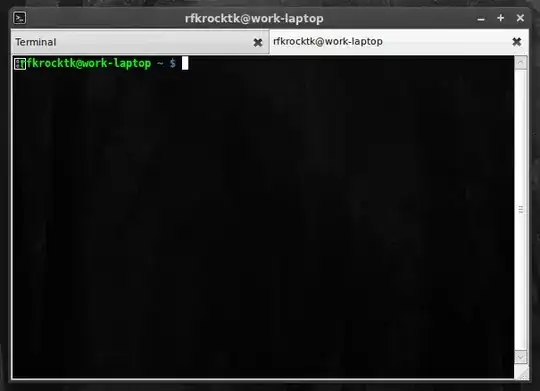
Screenshot of prompt

Here's my actual PS1 prompt:

PS1='\[\e]2;\u@\h\a${debian_chroot:+($debian_chroot)}\[\033[01;32m\]\u@\h\[\033[01;34m\] \w \$\[\033[00m\] '

Can anyone spot the problem? What am I doing wrong here?

Naftuli Kay
  • 38,686
  • 85
  • 220
  • 311

2 Answers2

8

You're missing the last \] to end the title bar sequence. The result is that it's eating up some chars & displaying a weird character at the front.

try one of these:

  • \[\033]2; \u@\h \007\]
  • \[\e]0;\u@\h\a\]
TrinitronX
  • 904
  • 8
  • 15
3

The start of your prompt has a fragment in it: \[\e]2;\ that should probably be something more like: \[e[0;32m\] to set the colour green.

\[ begins a sequence of non-printing characters. \e is the ascii escape character and the colour green is 0;32m

There is an excellent break down of the elements of a coloured prompt on the Arch Wiki: https://wiki.archlinux.org/index.php/Color_Bash_Prompt

jasonwryan
  • 71,734
  • 34
  • 193
  • 226
  • Please see http://unix.stackexchange.com/q/14113/5614, here, I'm told that in order to set the window title, I need this escape sequence. What should I do? – Naftuli Kay Jun 01 '11 at 21:37
  • So you have two separate issues: the broken prompt and you want to set the terminal title. I'd fix the first - using the approach I have suggested above, and then that should allow you to achieve the second. – jasonwryan Jun 01 '11 at 21:51