15

It is easy to list the printers you've already installed with this command:

lpstat -a

However, this does not list network printers you have NOT installed.

nmap will scan for all open ports on the LAN, but the list produced won't be limited to network printers:

sudo nmap -sT 192.168.0.1-254

Is there a command that does the following:

  1. Detects the LAN you're currently connected to automatically.
  2. Scans the entire LAN looking for Network Printers specifically.
  3. Produces a list of Network Printers providing both their hostnames and IP addresses.

For example, I logged into the web interface of a Imagistics fx2100 printer today. It had a "Find device" feature that was capable of finding all the network printers on the LAN (see screenshot below). Notice that this Imagistics printer's built-in utility found printers of all brands (NOT just Imagistic ones).

It seems like there would be a command in Linux that could achieve the same list and info (without scripting):
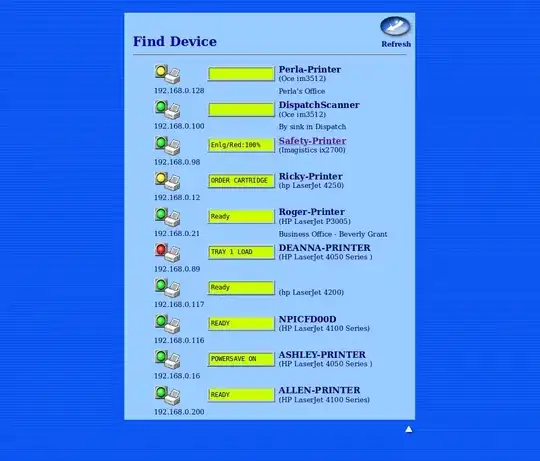
enter image description here

Lonnie Best
  • 4,895
  • 6
  • 27
  • 42
  • 2
    The problem here is that the criteria ("Network Printer") is something that only makes sense to humans. Computer programs aren't going to have a clear sense of that idea. You might try doing a network sweep for IP addresses that successfully connect on the JetDirect port (tcp/9100). The list is still likely to be incomplete in the case of non-JetDirect printers such as desktop printers shared over SMB. – Bratchley Jun 30 '14 at 18:16
  • 1
    As you mention, a program can scan open ports of each IP on the LAN, and even do a little talking to those ports to gather data. I understand how this could be done. I'm just unaware of any command line utility that already does this (specifically for printers). – Lonnie Best Jun 30 '14 at 18:44
  • 1
    You can do sweeps to find a list of valid IP addresses and use `nc` to verify that it can connect on `tcp/9100`. You'd have to script something since this is a very specific problem you're trying to solve. So I doubt anyone's written a tool to do this. – Bratchley Jun 30 '14 at 19:33

2 Answers2

18

If avahi-daemon is running then,

avahi-browse -a | grep Printer
infoclogged
  • 919
  • 2
  • 11
  • 24
  • 1
    This `avahi-browse -a` command seems to list the same printers multiple times and (even with the `--all` argument) it leaves out pertinent information that's shown in the screen shot above (like the ip address of the printer it is listing). It amazes me that this "Imagistics fx2100 printer" contains firmware that beats every Linux utility I've seen, when it comes to listing all printers of all brands (that are not even installed, but are providing network printing). – Lonnie Best Oct 04 '19 at 11:40
  • 1
    @Lonniebiz If you _don't_ `grep` for 'Printer', then you'll get useful info including the IP address. With `sed`, you can use `avahi-browse -t -d local -c -a --resolve | sed -n '/^=.*Printer/,/txt =/p'` to select all **blocks** of lines that pertain to printers. – JellicleCat Dec 22 '20 at 00:13
3

There isn’t a program that does this specifically, but with nmap -A (advanced host detection/fingerprinting) may be able to identify most printers. You’re going to have to filter it after.

Giacomo1968
  • 197
  • 1
  • 10
Till
  • 91
  • 3