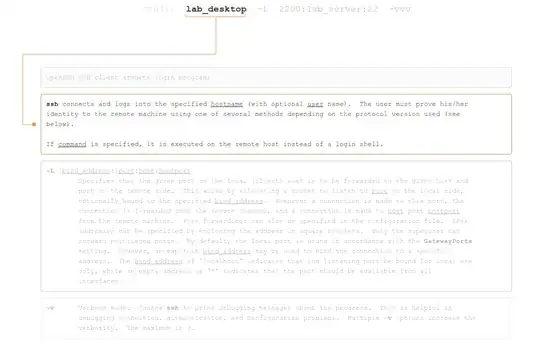
Its an answer I got from questioning about port forwarding but I'm not sure what it means..
$ ssh lab_desktop -L 2200:lab_server:22 -vvv
my wild guess:
first get connect to lab_desktop and then again log into lab_server(port 22) and the received data from this connection will be forwarded to lab_desktop, port 2200.
is my wild guess right??
but I still don't understand what that '-vvv' means...
update after applying answer:
okay with creek's helpful answer&comments, I did what I can to make creek's answer work
again, let me be clear with the terminologies
mypc - the one that's doing all the typing
lab_desktop - ssh server
lab_server - final destination that I want to communicate with. This server will only allow connection from lab_desktop. And one more thing: it will only allow connections through port 122.
okay since logging in to lab_desktop and lab_server requires username and password, I just made rsa authentication for mypc--lab_desktop and lab_desktop--lab_server so that I wouldn't confront the trouble of entering the password all the time and just to set aside the possibility of password entering making the ssh command more complex.
After that I used the command:
ssh Black@lab_desktop -v -L 2200:lab_server:122
the below is the output
chulhyun@chulhyun-Inspiron-3420:~/.ssh$ ssh Black@$labcom -v -L 2200:143.248.146.204:122
OpenSSH_5.9p1 Debian-5ubuntu1.4, OpenSSL 1.0.1 14 Mar 2012
debug1: Reading configuration data /etc/ssh/ssh_config
debug1: /etc/ssh/ssh_config line 19: Applying options for *
debug1: Connecting to 143.248.143.198 [143.248.143.198] port 22.
debug1: Connection established.
debug1: identity file /home/chulhyun/.ssh/id_rsa type -1
debug1: identity file /home/chulhyun/.ssh/id_rsa-cert type -1
debug1: identity file /home/chulhyun/.ssh/id_dsa type -1
debug1: identity file /home/chulhyun/.ssh/id_dsa-cert type -1
debug1: identity file /home/chulhyun/.ssh/id_ecdsa type -1
debug1: identity file /home/chulhyun/.ssh/id_ecdsa-cert type -1
debug1: Remote protocol version 2.0, remote software version OpenSSH_6.6.1
debug1: match: OpenSSH_6.6.1 pat OpenSSH*
debug1: Enabling compatibility mode for protocol 2.0
debug1: Local version string SSH-2.0-OpenSSH_5.9p1 Debian-5ubuntu1.4
debug1: SSH2_MSG_KEXINIT sent
debug1: SSH2_MSG_KEXINIT received
debug1: kex: server->client aes128-ctr hmac-md5 none
debug1: kex: client->server aes128-ctr hmac-md5 none
debug1: sending SSH2_MSG_KEX_ECDH_INIT
debug1: expecting SSH2_MSG_KEX_ECDH_REPLY
debug1: Server host key: ECDSA 79:64:5d:e7:ac:78:b7:52:3d:9a:6a:3b:c1:37:a0:2d
debug1: Host '143.248.143.198' is known and matches the ECDSA host key.
debug1: Found key in /home/chulhyun/.ssh/known_hosts:1
debug1: ssh_ecdsa_verify: signature correct
debug1: SSH2_MSG_NEWKEYS sent
debug1: expecting SSH2_MSG_NEWKEYS
debug1: SSH2_MSG_NEWKEYS received
debug1: Roaming not allowed by server
debug1: SSH2_MSG_SERVICE_REQUEST sent
debug1: SSH2_MSG_SERVICE_ACCEPT received
debug1: Authentications that can continue: publickey,password,keyboard-interactive
debug1: Next authentication method: publickey
debug1: Trying private key: /home/chulhyun/.ssh/id_rsa
debug1: read PEM private key done: type RSA
debug1: Authentication succeeded (publickey).
Authenticated to 143.248.143.198 ([143.248.143.198]:22).
debug1: Local connections to LOCALHOST:2200 forwarded to remote address 143.248.146.204:122
debug1: Local forwarding listening on ::1 port 2200.
debug1: channel 0: new [port listener]
debug1: Local forwarding listening on 127.0.0.1 port 2200.
debug1: channel 1: new [port listener]
debug1: channel 2: new [client-session]
debug1: Requesting [email protected]
debug1: Entering interactive session.
debug1: Sending environment.
debug1: Sending env LANG = ko_KR.UTF-8
Last login: Tue Jun 24 16:47:27 2014 from 143.248.244.12

Black@Black-PC ~
$
its long but I guess the only thing that I should be looking is the lines:
debug1: Local connections to LOCALHOST:2200 forwarded to remote address 143.248.146.204:122
debug1: Local forwarding listening on ::1 port 2200.
when I use my netstat to see if this is true(netstat -tulpn | grep 2200) the output is :
root@chulhyun-Inspiron-3420:/etc/ssh# netstat -tulpn | grep 2200
tcp        0      0 127.0.0.1:2200          0.0.0.0:*               LISTEN      14966/ssh
tcp6       0      0 ::1:2200                :::*                    LISTEN      14966/ssh
so I guess the ssh hopping is established after all..
The problem now is when I try to use the port 2200 in mypc. As Creek suggested, I need to exploit this port so I tried logging in with both my root account and user account but the result was a failure due to password..
chulhyun@chulhyun-Inspiron-3420:~$ su
password:
root@chulhyun-Inspiron-3420:/home/chulhyun# ssh root@localhost -p 2200
root@localhost's password:
Permission denied, please try again.
root@localhost's password:

root@chulhyun-Inspiron-3420:/home/chulhyun# exit
exit
chulhyun@chulhyun-Inspiron-3420:~$ ssh chulhyun@localhost -p 2200
chulhyun@localhost's password:
Permission denied, please try again.
The passwords are the right ones I'm sure of it. But I don't understand why it won't work...
I come up to this point. Could you help be reach further?
update
the new problem that I'm facing is discussed and solved at: Linux can't recognize the right password when ssh'ing?