2

I tried to install inkscape in my Ubuntu 14, but it doesn't exist. And when I install my ubuntu says that is already install, but when I put in the terminal $ inkscape it says that is necessary to install.

It is confusion.

See file below

How can I fix this problem?
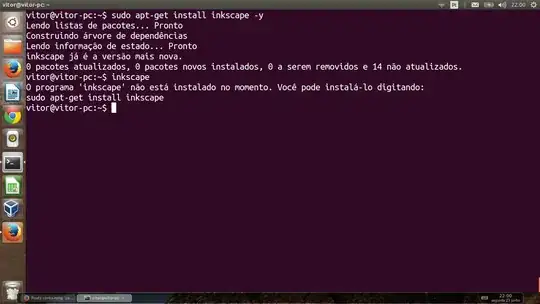
enter image description here

Vitor Mazuco
  • 1,014
  • 6
  • 19
  • 39
  • 1
    *Please* don't post screenshots of terminal output: just paste the text. And you can paste in English by prepending `LC_ALL=C` to your commands... – jasonwryan Jun 24 '14 at 01:10
  • first of, if you use `-y` (which just makes apt-get assume that you agree with installing the suggested package), set the flag after install and before to-be-installed packages. Second try to `sudo apt-get update` , then `sudo apt-get install inkscape` – polym Jun 24 '14 at 01:11
  • 2
    What happens if you type `which inkscape`? Do you see it in the Applications menu? – Renan Jun 24 '14 at 01:18
  • See this blog post, it shows how to add the Inkscape PPA: http://www.enqlu.com/2014/03/how-to-install-latest-version-inkscape-in-ubuntu-14-04-or-linux-mint-17-via-ppa.html – slm Jun 24 '14 at 02:12
  • cross posted: http://askubuntu.com/questions/487360/cant-install-inkscape-on-ubuntu – Anthon Jun 24 '14 at 19:07

2 Answers2

5

I'm sorry but I can't read your language.

It is possible that you forgot to add the PPA of inkscape:

  1. Add inkscape.dev/stable PPA

    sudo add-apt-repository ppa:inkscape.dev/stable
    
  2. Update list

    sudo apt-get update 
    
  3. install inkscape

    sudo apt-get install inkscape
    

Source: How to install latest Version Inkscape In Ubuntu 14.04 or Linux Mint 17 Via PPA

slm
  • 363,520
  • 117
  • 767
  • 871
polym
  • 10,672
  • 9
  • 41
  • 65
  • 1
    `inkscape` is in the default repositories of ubuntu, it's not necessary to add PPA for this. – chaos Jun 24 '14 at 09:22
  • The Inkscape snap is newer than the version in the archive and works on all supported Ubuntu versions, including 14.04. Execute `sudo apt install snapd` in a terminal to install snapd and then `sudo snap install inkscape` to install the Inkscape snap. – Martin Wimpress Apr 30 '18 at 12:17
1

Maybe you had inkscape installed at some point, and then some files got deleted?

In 14.04, inkscape is included in the main repository:

$ apt-cache policy inkscape
inkscape:
Installed: 0.48.4-3ubuntu2
Candidate: 0.48.4-3ubuntu2
Version table:
*** 0.48.4-3ubuntu2 0
    500 http://us.archive.ubuntu.com/ubuntu/ trusty/main amd64 Packages
    100 /var/lib/dpkg/status

What happens if you do the following?:

$ apt-get update; apt-get install --reinstall inkscape
x86tux
  • 551
  • 2
  • 5