20

I try to chmod some files and I get the error "disk quota exceeded":

enter image description here

It's true that I don't have that much space remaining in the filesystem where I use chmod, namelynfs.mit.edu:/export/evodesign/beatdb (which is an NFS), either in terms of bytes or in terms of inodes:
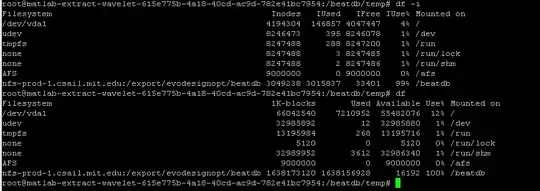
enter image description here

But why does chmod need more space?

I use Ubuntu 12.04.


Edit: Some more info following the comments:

1) I don't know the OS of the NFS server (nmap -O nfs-server-ip didn't return anything)

2) The NFS protocol in use by a mounted NFS filesystem is NFSv3:
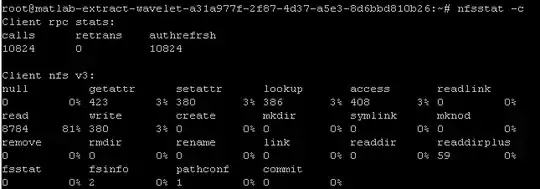
enter image description here

3) quota -v:

enter image description here

4) I don't have any /var/log/messages logs, I do have some /var/log/syslog logs but nothing looks weird there.

Franck Dernoncourt
  • 4,749
  • 15
  • 48
  • 79
  • @Mikel : I had chosen the title in reference with out-of-place algorithms (http://en.wikipedia.org/wiki/In-place_algorithm), but I guess out-of-space is good too. – Franck Dernoncourt Jun 22 '14 at 02:52
  • Please feel free to change it back if you think it's better. – Mikel Jun 22 '14 at 03:33
  • Do you know the OS of the NFS server? And which version of the NFS protocol is in use? – Mikel Jun 22 '14 at 03:37
  • 1
    Sorry, I don't know the OS (`nmap -O nfs-server-ip` didn't return anything) and I'm not sure how to [determine which version of the NFS protocol is in use by a mounted NFS filesystem](http://unix.stackexchange.com/q/138511/16704). – Franck Dernoncourt Jun 22 '14 at 04:03
  • So yeah, NFS v3! – Franck Dernoncourt Jun 22 '14 at 04:13
  • 3
    "Disk quota exceeded" is a different error than "filesystem full". Type `quota -v` to see if you're over quota for that filesystem. You may need to do this when logged in as the owner of the files in question rather than as root. It's possible that your server rejects all writes to files or to file attributes when the file owner is over quota. – Mark Plotnick Jun 22 '14 at 13:23
  • @MarkPlotnick May be but should be considered a bug in the broader sense you obviously mean as `chmod` does not write to the file but to its inode. It is impossible to consume more space by that, isn't it? I would understand that in the case of `setfacl` i.e. ACLs which really consume space on the file system. – Hauke Laging Jun 22 '14 at 13:33
  • @FranckDernoncourt Does your system log (/var/log/messages or /var/log/syslog) contain any messages about this error? – Mark Plotnick Jun 22 '14 at 13:50
  • 1
    @HaukeLaging In some filesystem designs, you can run out of space when trying to remove a file (and there are good reasons behind this). – Gilles 'SO- stop being evil' Jun 22 '14 at 22:08
  • Maybe it's because the file system is trying to write a new inode, then swap a pointer in-place, then erase the old one (consistency through transactions)? – John Dvorak Jun 22 '14 at 22:11
  • @Gilles I was aware of that but in that case it is a hard technical limit. It doesn't make sense to apply this to quota, though, IMHO. – Hauke Laging Jun 22 '14 at 23:04
  • Thanks all for your ideas, I edited the question to add more information. – Franck Dernoncourt Jun 23 '14 at 15:50

1 Answers1

5

As noted in the comments: it seems likely that you're over quota, and the filesystem is rejecting your write for this reason.

There are many filesystems where all writes are journaled, with the old version kept. One such filesystem is ZFS - read about the interaction between ZFS snapshots and quotas.

(However, the problem may just be that the NFS server rejects all writes when you're over quota).

Ben XO
  • 216
  • 1
  • 4