8

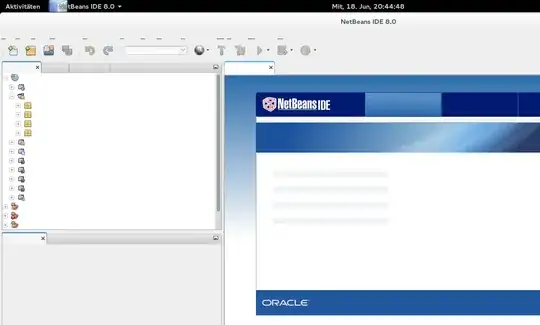
I startet netbeans/intelliJ/squirrelSQL after I didn't use it for a few days/weeks and now the menu doesn't show text. There are just the underlineds. My system:

  • ArchLinux (everything up to date, everything installed via pacman)
  • Gnome 3.12.2
  • OpenJDK Runtime Environment (IcedTea 2.5.0) (Arch Linux build 7.u60_2.5.0-2-x86_64)
  • OpenJDK 64-Bit Server VM (build 24.60-b09, mixed mode)
  • Java: /usr/lib/jvm/java-7-openjdk/jre/bin/java

Any idea?

Screenshot: enter image description here
imz -- Ivan Zakharyaschev
  • 15,113
  • 15
  • 61
  • 123
Tobias
  • 567
  • 3
  • 10

2 Answers2

7

I had the same issue.

Using the system's anti-aliased fonts fixed the issue for me. You can find a description in the Arch Wiki: https://wiki.archlinux.org/index.php/java#Tips_and_tricks

Short answer: put the following line into /etc/profile.d/jre.sh:

export _JAVA_OPTIONS='-Dawt.useSystemAAFontSettings=on -Dswing.aatext=true'

You may have to log out and log back in for the new settings to take effect.

xinxinw1
  • 28
  • 2
Atomisirsi
  • 71
  • 1
  • Note: if you don't want to modify global files (or if you can't, because of permissions), this answer can be adapted. I had the same problem with oXygen, and I fixed it by running it using `_JAVA_OPTIONS='-Dawt.useSystemAAFontSettings=on -Dswing.aatext=true' ./oxygen16.1` instead of simply `./oxygen16.1`. – Ted Nov 29 '17 at 09:32
1

It appears to be an issue with the latest version of Java (7.u60_2.5.0-2).

If I rollback the versions of jre7-openjdk and jre7-openjdk-headless to 7.u55_2.4.7-1 using the pacman cache

# pacman -U '/var/cache/pacman/pkg/jre7-openjdk-7.u55_2.4.7-1-x86_64.pkg.tar.xz'
# pacman -U '/var/cache/pacman/pkg/jre7-openjdk-headless-7.u55_2.4.7-1-x86_64.pkg.tar.xz'

then Java programs seem to work correctly again. Hopefully, Java or Arch Linux will post an update to fix this issue.

xinxinw1
  • 28
  • 2