I can't find a setting the makes Evolution display messages sent by me in thread view. I can find them in Sent folder, but I'd like them to be part of the normal threads.
Asked
Active
Viewed 4,635 times

2 Answers
3
You will need a couple of steps. Enable the threaded folder view with Ctrl+T. Then set "Include threads: all related" in the search folder configuration.
If you are using an SMTP server other than Gmail's you may need a further hack. You could bcc yourself at a plus extension of your Gmail address; something like "+threaded", then configure the external Evolution accounts to "Always bcc to" this address.
There is a detailed walk-through of this approach by Matt McCutchen on his blog.

jasonwryan
- 71,734
- 34
- 193
- 226
-
1"if using a server other than gmail, you could use gmail's plus addressing feature." - did i read that right? – Woodrow Barlow Aug 05 '16 at 16:20
-
@WoodrowBarlow Yes, you are not obligated to use Gmail's SMTP service. – jasonwryan Aug 05 '16 at 19:39
1
I already shared my answer here: https://askubuntu.com/questions/1214540/fully-track-of-a-mail-in-evolution-thread-of-a-mail/1309852#1309852
Here is a copy of my answer:
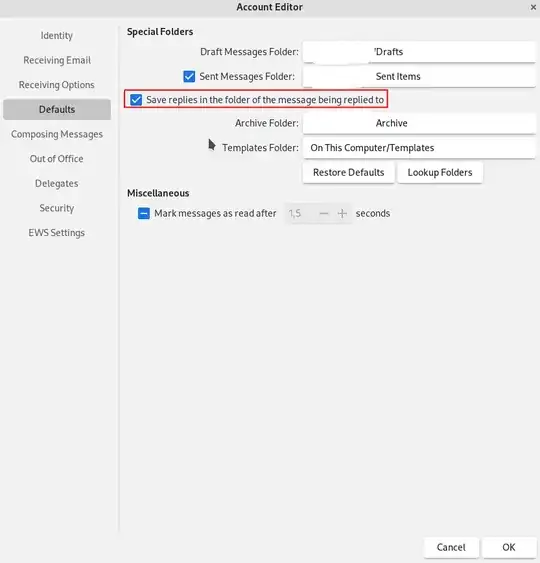
One way of achieving this is to save your replies in the same folder as the received mails. There is an option to make this the default behavior for an account. It is found under: Edit->Accounts, select your email account and hit edit. And check the option "Save replies in the folder of the messages being replied to".

sgilles
- 31
- 4
-
This should be the answer, it's a much better solution than CCing yourself all the emails you send!! – Ari Cooper-Davis May 19 '23 at 11:04