NB: Yes, I've read How can I tell if I'm in a tmux session from a bash script?
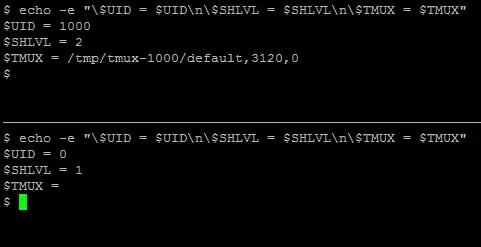
How can I find out whether I am running inside a Tmux session from my shell or shell script or shell function or alias if I used sudo su - in between?:
NB: Yes, I've read How can I tell if I'm in a tmux session from a bash script?
How can I find out whether I am running inside a Tmux session from my shell or shell script or shell function or alias if I used sudo su - in between?:

In your /etc/sudoers file you can explicitly allow environment variables to propagate to the sudo environment.
Defaults    requiretty

Defaults    env_reset
Defaults    env_keep =  "COLORS DISPLAY HOSTNAME HISTSIZE INPUTRC KDEDIR LS_COLORS"
Defaults    env_keep += "MAIL PS1 PS2 QTDIR USERNAME LANG LC_ADDRESS LC_CTYPE"
Defaults    env_keep += "LC_COLLATE LC_IDENTIFICATION LC_MEASUREMENT LC_MESSAGES"
Defaults    env_keep += "LC_MONETARY LC_NAME LC_NUMERIC LC_PAPER LC_TELEPHONE"
Defaults    env_keep += "LC_TIME LC_ALL LANGUAGE LINGUAS _XKB_CHARSET XAUTHORITY"
So one method would be to add a variable that is resultant of tmux and let it through.

% sudo su -- 2<<STATE
>    TMUX='$TMUX'
>    exec 2>/dev/tty
> STATE
# . /dev/fd/2
# {
#   echo "$TMUX"
#   echo "$TMUX" >&2
# }

###OUTPUT

/tmp/tmux-1000/default,23878,1
/tmp/tmux-1000/default,23878,1
sudo will close all file descriptors for its invoked process but 0,1,2 and you need /dev/tty on <&0 or you can't enter a password, but if you can accept blocking >&2 for the span it takes to run a single command then you can do the above.
You can use this technique to bring along whatever else you might like as well.

