TexPad is creating it. I know that it is under some deadkey. I just cannot remember it is name.
The blue character:
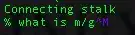
I just want to mass remove them from my document.
How can you type it?
TexPad is creating it. I know that it is under some deadkey. I just cannot remember it is name.
The blue character:
I just want to mass remove them from my document.
How can you type it?


It is known as carriage return.
If you're using vim you can enter insert mode and type CTRL-v CTRL-m. That ^M is the keyboard equivalent to \r.
Inserting 0x0D in a hex editor will do the task.
How do I remove it?
You can remove it using the command
perl -p -i -e "s/\r//g" filename
As the OP suggested in the comments of this answer here, you can even try a `
dos2unix filename
and see if that fixes it.
As @steeldriver suggests in the comments, after opening the vim editor, press esc key and type :set ff=unix.
References
https://stackoverflow.com/questions/1585449/insert-the-carriage-return-character-in-vim
https://stackoverflow.com/a/7742437/1742825
-ksh: revenue_ext.ksh: not found [No such file or directory]


Code
sed -i 's/^M//' filename.txt
While typing ^M in the command, do not use ^M as that only inserts what is displayed, not what causes it to be displayed; use CtrlV CtrlM.


As Ramesh notes, CTRL+V CTRL+M should get you the literal character - though you're not limited to doing this only in vim - you should be able to do the same on any canonical mode tty.
cat ./file | tr -d '\r' >./file
...might do the job.

