2

I am on ubuntu 12.04 and following this tutorial. I want to setup cron to run in the background but I don't have a chckconfig in sbin so I can't run sudo /sbin/chkconfig crond on

I am fairly new to sys admin stuff so need advice on how to workaround this. I tried searching for the crond command but could not find it. I found another instance of chckconfig but am not sure if this is the same thing I am supposed to use to schedule cron.

$ sudo !!
sudo find / -executable -name crond
$ sudo find / -name chkconfig
/etc/bash_completion.d/chkconfig

Why is my chckconfig in /etc/bash... Is it the same one used in this tutorial?

How can I set cron to run on background?

$ sudo !!
sudo find / -executable -name crond
$ sudo find / -name chkconfig
/etc/bash_completion.d/chkconfig
phemmer
  • 70,657
  • 19
  • 188
  • 223
bernie2436
  • 6,505
  • 22
  • 58
  • 69

1 Answers1

1

chkconfig is a Red Hat feature/command so that doesn't surprise me that it doesn't work for you on Ubuntu. You can start cron using the services command instead.

$ sudo services crond start

Example

$ sudo service cron start
cron start/running, process 20209

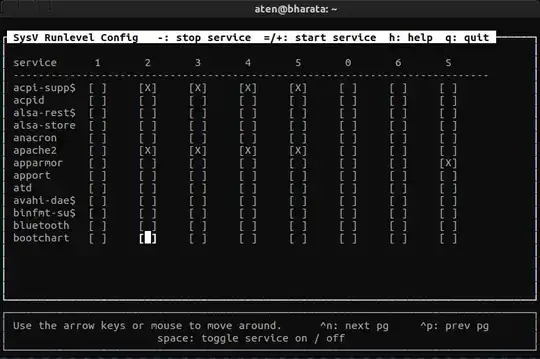
This will run it for the duration that the box is up. To make this service start as part of a bootup you can use this command to configure it,sudo sysv-rc-conf, but first you'll likely need to install it:

$ sudo apt-get install sysv-rc-conf

You can then use the UI to select the crond service so that it runs at bootup.

   ss #1

You can also use initctl and configure the service so that it starts via the command line, but that's a bit more involved than the above. See this article titled: Manage System Startup and Boot Processes on Linux with Upstart for some details on it.

References

slm
  • 363,520
  • 117
  • 767
  • 871