For NTFS
In researching this I found this AskUbuntu Q&A titled: How do I use 'chmod' on an NTFS (or FAT32) partition?. According to this thread there are several ways to go about this.
Methods
Control the permissions at mount time.
$ sudo mount -t ntfs -o \
    rw,auto,user,fmask=0022,dmask=0000 /dev/whatever /mnt/whatever
Using a user mapping file
Contrary to what most people believe, NTFS is a POSIX-compatible¹ filesystem, and it is possible to use permissions on NTFS.
Consult the ntfs-3g man page as well as this ntfs-3g documentation on advanced ownership and permissions. The user mappings is covered in this topic titled: User Mapping.
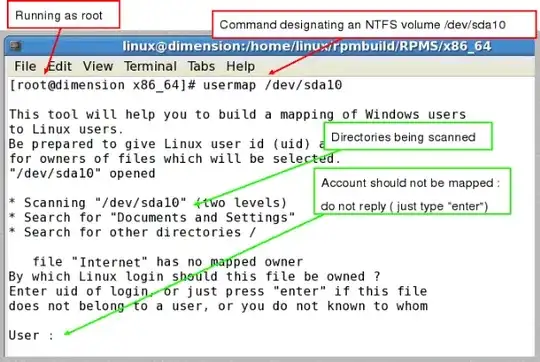
You can then generate a usermap file like so:
For CIFS
In your case you're dealing with CIFS (shares mounted via mount.cifs) so the above would not be applicable. In that case you can use the command-line tools getcifsacl & setcifsacl. The man page for setcifsacl has the following examples:
Add an ACE
   $ setcifsacl -a "ACL:CIFSTESTDOM\user2:DENIED/0x1/D" <file_name>
   $ setcifsacl -a "ACL:CIFSTESTDOM\user1:ALLOWED/OI|CI|NI/D" <file_name>
Delete an ACE
$ setcifsacl -D "ACL:S-1-1-0:0x1/OI/0x1201ff" <file_name>
Modify an ACE
$ setcifsacl -M "ACL:CIFSTESTDOM\user1:ALLOWED/0x1f/CHANGE" <file_name>
Set an ACL
   $ setcifsacl -S "ACL:CIFSTESTDOM\Administrator:0x0/0x0/FULL,
   ACL:CIFSTESTDOM\user2:0x0/0x0/FULL," <file_name>


