35

There's a website, www.example.com, that I tried to block myself from accessing because it wastes too much of my time. So I configured my /etc/hosts file. I added the following lines, to block the website on both IPv4 and IPv6:

127.0.0.1 www.example.com
::1 www.example.com
127.0.0.1 http://www.example.com
::1 http://www.example.com
127.0.0.1 example.com
::1 example.com

I restarted my computer, and I cannot wget www.example.com, and pinging www.example.com works as expected, but the website is not actually blocked in my browser! I can still access it in Firefox 28 and Chromium.

Questions

  • What's going on?
  • How do I block this site using systems-level tools instead of using browser extensions?
slm
  • 363,520
  • 117
  • 767
  • 871
Newb
  • 1,062
  • 2
  • 12
  • 19
  • In your browser, did you type `http://www.example.com` (which should be blocked) or did you type `http://example.com` (which is not blocked)? – John1024 May 04 '14 at 05:51
  • @John1024 I amended my question to address yours. In the browser, `example.com` and `http://example.com` are blocked, but `www.example.com`, and `http://www.example.com` are not blocked. – Newb May 04 '14 at 07:14
  • 1
    @Newb: What Linux distro do you use? – cuonglm May 04 '14 at 08:21
  • 1
    Have a look at [hostsblock](http://gaenserich.github.io/hostsblock/): it automates this for you and works brilliantly... – jasonwryan May 04 '14 at 08:55
  • I configured DNS-level blocking at my home DNS server. For those with less technical aptitudes, pi-hole is an interesting project. http://pi-hole.net – Rui F Ribeiro Jan 04 '16 at 08:44
  • It wasn't immediately obvious to me what the OP was doing. The lines beginning with 127.0.0.1 are to redirect example.com to localhost. So this is why the OP says that pinging "works as expected," i.e., it pings localhost rather than the actual web server at example.com. The lines beginning with ::1 are apparently for IPv6. –  Jan 05 '17 at 23:57

3 Answers3

16

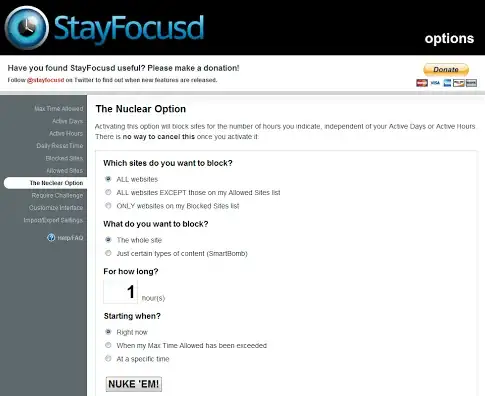
Rather then make this block using /etc/hosts I'd suggest using a browser addon/plugin such as this one named: BlockSite for Firefox or StayFocusd for Chrome.

BlockSite

  ss #1

StayFocusd

                    ss #2

But I want to really use /etc/hosts file

If you must do it this way you can try adding your entries like this instead:

0.0.0.0   www.example.com
0.0.0.0   example.com
::0       www.example.com
::0       example.com

You should never add entries to this file other than hostnames. So don't put any entries in there that include prefixes such as http:// etc.

slm
  • 363,520
  • 117
  • 767
  • 871
  • 21
    The OP does expressly ask for solutions that don't involve browser plugins/extensions... – jasonwryan May 04 '14 at 07:46
  • 1
    @jasonwryan - thanks, missed that last sentence in the Q. – slm May 04 '14 at 07:53
  • 2
    The last part of your answer was correct --- my mistake was that I had written `http://www.example.com` instead of `www.example.com`. Now the site is blocked. – Newb May 04 '14 at 18:14
  • This is useful, and both chrome & firefox has an extension named `block site`, both great. – Eric Oct 14 '15 at 21:03
  • Alas, what I needed was a plug-in that would ignore all the links to other sites than the current one and would be activated to sites of my own choice. – Rui F Ribeiro Dec 24 '16 at 09:50
  • A modification to the `hosts` file should take effect without having to restart anything. In case of redirects, you may have to block the target of the redirect too, though. – Thorkil Værge Aug 11 '21 at 14:28
5

You need to flush your DNS cache. According to this article, you can do that by restarting the following services:

  • nscd
  • dnsmasq
  • named
Michael Mrozek
  • 91,316
  • 38
  • 238
  • 232
totten
  • 179
  • 1
  • 3
  • 1
    The article is from 2008 and appears to be out of date. My linux mint install doesn't have nscd or rndc. –  Jan 05 '17 at 23:53
  • that means you do not have dns caching enabled. so you are not dealing with the similar issue op has. if your issue is dns caching, that may be result of any other machine on your network caches nameservers and responses queries instead of the actual dynamic name server. – totten Jan 06 '17 at 00:41
  • 1
    sudo systemd-resolve --flush-caches worked on ubuntu 20.04 – Nick Jun 12 '20 at 16:49
1

After I updated /etc/hosts I needed to clear browser cache (chrome).

type in url:

chrome://settings/clearBrowserData

remove all: leave unchecked only "passwords.."

John Tribe
  • 111
  • 3