The following screenshot shows the current state of my hard disc.
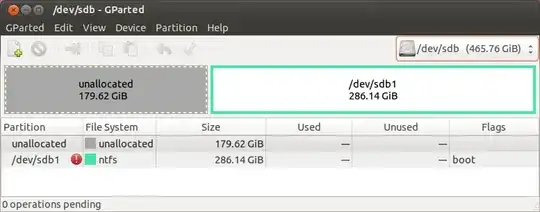
The unallocated part of the disc used to contain two operating systems:
- Windows and Ubuntu, in this order. Windows has been installed first. Ubuntu used Grub.
- I do not have information about specific partitioning.
- There was a home partition of Ubuntu was encrypted. I wrote down the passphrase.
The NTFS partition is not of interest for this question. I already managed to recover data stored there.
Do you know any tool for Linux or Windows which is capable of recovering the partitions? I assume that I lost the partition table or just Grub.
Interim results
Running testdisk
After running the Quick Search the following shows up:
Disk /dev/sdb - 500 GB / 465 GiB - CHS 969021 16 63

Warning: the current number of heads per cylinder is 16
but the correct value may be 255.
You can use the Geometry menu to change this value.
It's something to try if
- some partitions are not found by TestDisk
- or the partition table can not be written because partitions overlaps.

[Continue]
Then ...
Disk /dev/sdb - 500 GB / 465 GiB - CHS 969021 16 63
     Partition             Start        End    Size in sectors
 * HPFS - NTFS               2   0 33    205   3 19     204800
 P HPFS - NTFS             205   3 20 203174   9 41  204593152
 P Linux                203176  10 11 305359   3 51  103000064
 L Linux                313112   6  7 373707   2 50   61079552
   HPFS - NTFS          373707   2 51 969022  15 47  600078336
   HPFS - NTFS          373707   2 58 969020  15 63  600076329
Success story
Finally, I was able to recover the partition table. I cloned the drive using dd and had to change the geometry settings of the target drive. Then I was able to detect the Linux partitions on the cloned hard drive. Finally, I wrote the partition table via TestDisk to the clone hard drive. I did not want to alter the original drive to avoid total damage.
To actually mount and copy the data from the encrypted home partition I followed this post by rausch. Helpful background information can be read in: Unwrapping passphrase and inserting into the user session keyring failed.


