193

I am looking for a program which I can use to create ASCII diagrams such these:

    +---------+
    |         |                        +--------------+
    |   NFS   |--+                     |              |
    |         |  |                 +-->|   CacheFS    |
    +---------+  |   +----------+  |   |  /dev/hda5   |
                 |   |          |  |   +--------------+
    +---------+  +-->|          |  |
    |         |      |          |--+
    |   AFS   |----->| FS-Cache |
    |         |      |          |--+
    +---------+  +-->|          |  |
                 |   |          |  |   +--------------+
    +---------+  |   +----------+  |   |              |
    |         |  |                 +-->|  CacheFiles  |
    |  ISOFS  |--+                     |  /var/cache  |
    |         |                        +--------------+
    +---------+

It should preferably be a package available in Debian. The wonderful diagram displayed above is taken from the Linux kernel documentation. I cannot believe they were created by hand. There must be some tool to create them.

Braiam
  • 35,380
  • 25
  • 108
  • 167
Martin Vegter
  • 69
  • 66
  • 195
  • 326
  • 8
    You can draw this kind of diagrams from within `vim` using the [DrawIt](http://www.vim.org/scripts/script.php?script_id=40) plugin. – dawud Apr 26 '14 at 12:00
  • 17
    *"I cannot believe they were created by hand. There must be some tool to create them."* I can easily believe they were created by hand, especially if you were, e.g., working from a sketch or other source for the diagram. That wouldn't take more than 5 minutes. – goldilocks Apr 26 '14 at 12:05
  • 2
    I can quite easily believe they were created by hand because they're actually quite easy to do if you use a bit of common sense and visualise it in your head first. Of course, it takes a few minutes longer than it would with Asciio or something. – Miles Rout May 04 '14 at 15:59

7 Answers7

173

asciio

I've used asciio for several years. Many of the diagrams on this site I've created using asciio.

example

  vncviewer         .-,(  ),-.    
   __  _         .-(          )-.           gateway           vncserver 
  [__]|=|  ---->(    internet    )-------> __________ ------> ____   __ 
  /::/|_|        '-(          ).-'        [_...__...°]       |    | |==|
                     '-.( ).-'                               |____| |  |
                                                             /::::/ |__|

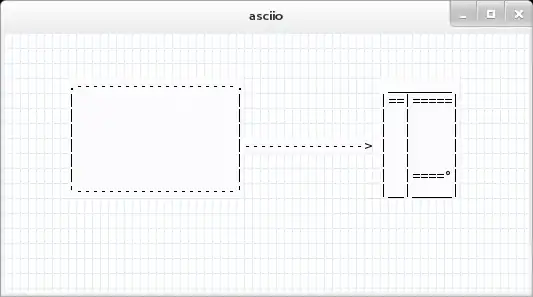
The GUI looks like this.

           ss of asciio

NOTE: Everything is driven from the right click menu as well as short-cut keys.

DrawIt

Using vim along with the DrawIt plugin you can also create basic diagrams. A good overview of how to install and use it is available here in this article titled: How To Create ASCII Drawings in Vim Editor (Draw Boxes, Lines, Ellipses, Arrows Inside Text File).

asciiflow

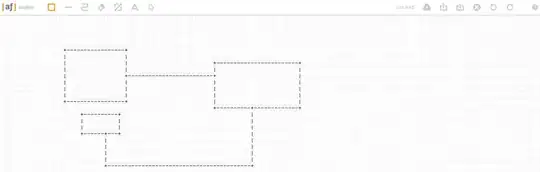
There's a website called asciiflow which is probably the easiest way to draw these types of diagrams.

   ss #2

JavE

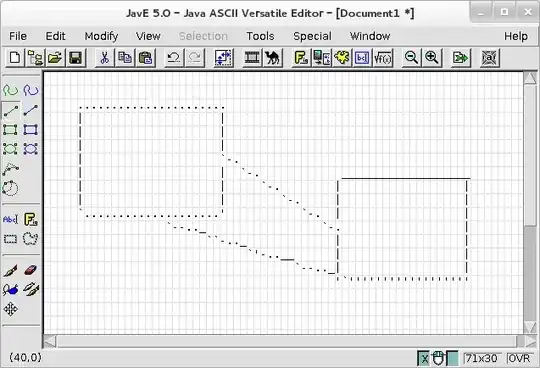
Another tool, JavE, written in Java that can create ascii diagrams like this as well.

                                 ,'''''''''''''|
                                 | Controller  |
                                 |             |
                                 '`'i''''''''''
                                  ,'        `.
                                ,'            `.
                               -                -
                     ,'''''''''''''|      ,''''''''''''`.
                     |    Model    |______|    View     |
                     |             |      |             |
                      `''''''''''''       '`'''''''''''''

The GUI looks like this:

   ss #2

Resources

slm
  • 363,520
  • 117
  • 767
  • 871
  • 1
    You could add http://diiagrams.com/ if you want – I3ck Dec 17 '17 at 16:41
  • The Windows installer for asciio from the link no longer works. The installer says it got a 404 error and then aborts. I just used asciiflow instead. – Joseph238 Jul 30 '18 at 22:05
  • 1
    @Joseph238 - thanks for the feedback, given this is Unix & Linux website I'm not sure most passer-by's will care all that much. If you come across a link to it pls let us know. – slm Jul 30 '18 at 22:23
  • 3
    Maybe add a note about: https://textik.com/. –  Oct 11 '18 at 06:51
  • 2
    I recently created [AsciiGrid](https://mbarkhau.keybase.pub/asciigrid/) which uses Svgbob to render diagrams. [Here is the diagram from the original question](https://mbarkhau.keybase.pub/asciigrid/#vvF;AOAOA;ECCCgAgAEBDAAAgAgAnAmAjAnlmrAAeEWETFhzgPyihipDiymSsPgAECCeDgUTEHPMFWETFkxgWCgAgAEizhmsDg0fCOFWHfCMOHViOBi6iAjcilkIgusDiRBECCCgAgAEAAECCeDvjnajjBhRmZkAlKDjbAAREWETFjMgzeDDAhNCTEHPMFAD-kEi0hAEAAEj9nYgABnFjMq2jMn7iAEBiMjGoXqFo7hADBiMjGuNh_CCeDgUTEHPMFWEJNFKiyAAZETFfEWgDgOCCEurhAglfCWHHLfCPh_k1nUyhqMhLBECCCgAgAE1cnZji) – mbarkhau Dec 30 '19 at 22:41
  • 1
    +1 for [asciiflow](http://asciiflow.com/)! I love its simple, easy-to-use online interface, and since it has a website you can just go to and start drawing in, it's **so** easy to get started with! – Gabriel Staples May 05 '20 at 03:28
33

Have a look at artist-mode or picture-mode for Emacs (see also this screencast). You might also want to check out ditaa.

tkrennwa
  • 3,445
  • 1
  • 14
  • 17
31

I found another answer; I am not sure it is fully usable, but remember that GNU roff (groff) has a processor for the Pic language as well as an ascii postprocessor; thus you may have a try at something like that (if you use Linux, everything should probably already be installed). Write a file called test.roff containing:

.PS
box "box1";
line
box "box2";
.PE

Then type: groff -Tascii -p test.roff, and you should get:

+------+     +------+
|      +-----|      |
| box1 |     |box2  |
+------+     +------+

Regards.

Thomas Baruchel
  • 1,143
  • 1
  • 8
  • 14
24

Maybe you will be interested in graph-easy.

Example:

   echo "[ Bonn ] -- car --> [ Berlin ], [ Ulm ]" | graph-easy

produces:

    +--------+  car   +-----+
    |  Bonn  | -----> | Ulm |
    +--------+        +-----+
      |
      | car
      v
    +--------+
    | Berlin |
    +--------+

You can install it with the following commands:

wget http://search.cpan.org/CPAN/authors/id/T/TE/TELS/graph/Graph-Easy-0.64.tar.gz
tar -xzf Graph-Easy-0.64.tar.gz
cd Graph-Easy-0.64
perl Makefile.PL
make test
sudo make install
PATH=$PATH:/opt/local/libexec/perl5.12/sitebin/graph-easy

(Note the version numbers in the two uppermost and the last line - they may change)

Some nice screenshots are available on the pages of lddot and dothost (because both tools are wrappers for graph-easy).

Sridhar Sarnobat
  • 1,692
  • 18
  • 27
Thomas Baruchel
  • 1,143
  • 1
  • 8
  • 14
4

For anyone using a Mac (not the original poster) there's a very nice tool called Monodraw. Of course you're going to pay a few bucks for the fact that it's highly polished and powerful and intuitive, but if this is something you do often, it's a handy tool to have available and $10 is peanuts compared to the time you'll save. If you don't do this often, there's a free trial available, so you're all set. It can even export to SVG

No, I don't work for the company. I'm just a happy user.

iconoclast
  • 9,057
  • 12
  • 56
  • 95
3

The ADia project aims to render ASCII diagrams using a human-readable language:

diagram: Foo
sequence:
foo -> bar: Hello World!

Output

 DIAGRAM: Foo                             

 +-----+             +-----+
 | foo |             | bar |
 +-----+             +-----+
    |                   |
    |~~~Hello World!~~~>|
    |                   |
    |<------------------|
    |                   |
 +-----+             +-----+
 | foo |             | bar |
 +-----+             +-----+

Read the documentation or Try the live demo page at github.io.

pylover
  • 3,328
  • 6
  • 21
  • 26
1

I just used https://textik.com/ and it worked great.

MarcH
  • 261
  • 2
  • 5