I need to change the value of MOTD using a script but I do not know how I should start. Am attaching sample MOTD.
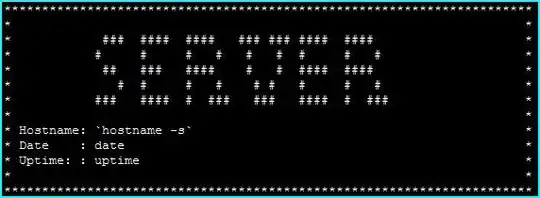
I need to change the value of MOTD using a script but I do not know how I should start. Am attaching sample MOTD.


To generate a MOTD in the style you're showing in your example you'll likely want to make use of the banner command. You can feed it the output from the hostname command to get a nice banner of your server's name.
To make this your MOTD you'll simply want to direct the output from these command to the file /etc/motd, which is what's used for displaying the MOTD.
$ ...cmd... > /etc/motd
NOTE: The commands I'm going to show below can be swapped into ...cmd....
$ banner $(hostname)

 #####   ######   #######  #######  #     #  #######   #####    #####
#     #  #     #  #        #        ##    #  #        #     #  #     #
#        #     #  #        #        # #   #  #        #        #
#  ####  ######   #####    #####    #  #  #  #####    #  ####  #  ####
#     #  #   #    #        #        #   # #  #        #     #  #     #
#     #  #    #   #        #        #    ##  #        #     #  #     #
 #####   #     #  #######  #######  #     #  #######   #####    #####
This one liner will give you nearly what you want:
$ (banner "server"; \
    printf "Hostname: %s\nDate    : %s\nUptime  :%s\n\n", \
    "$(hostname -s)" "$(date)" "$(uptime)")

 #####   #######  ######   #     #  #######  ######
#     #  #        #     #  #     #  #        #     #
#        #        #     #  #     #  #        #     #
 #####   #####    ######   #     #  #####    ######
      #  #        #   #     #   #   #        #   #
#     #  #        #    #     # #    #        #    #
 #####   #######  #     #     #     #######  #     #

Hostname: greeneggs
Date    : Thu Apr 24 22:39:23 EDT 2014
Uptime  : 22:39:23 up 3 days,  8:34,  6 users,  load average: 0.80, 1.06, 1.49
In addition to using the command line tool banner to print banner text, you can use another helper tool called boxes to wrap a box around arbitrary text.
$ boxes -d shell -p a1l2 <(hostname -s)
##############
#            #
#  greeneggs #
#            #
##############
We can use this approach and scale it up to do what you want like so:
$ boxes -d shell -p a1l2 \
    <(banner "server"; \
        printf "Hostname: %s\nDate    : %s\nUptime  :%s\n" \
        "$(hostname -s)" "$(date)" "$(uptime)")
###################################################################################
#                                                                                 #
#                                                                                 #
#   #####   #######  ######   #     #  #######  ######                            #
#  #     #  #        #     #  #     #  #        #     #                           #
#  #        #        #     #  #     #  #        #     #                           #
#   #####   #####    ######   #     #  #####    ######                            #
#        #  #        #   #     #   #   #        #   #                             #
#  #     #  #        #    #     # #    #        #    #                            #
#   #####   #######  #     #     #     #######  #     #                           #
#                                                                                 #
#  Hostname: greeneggs                                                            #
#  Date    : Thu Apr 24 22:54:09 EDT 2014                                         #
#  Uptime  : 22:54:09 up 3 days,  8:49,  6 users,  load average: 0.63, 0.81, 1.09 #
#                                                                                 #
###################################################################################

If you want to generate dynamic MOTD, check out this up to date guide
https://ownyourbits.com/2017/04/05/customize-your-motd-login-message-in-debian-and-ubuntu/
Basically, you have to
1) create /etc/update-motd.d
2) place your script there

motd is simply a file. From man motd:
NAME
       motd - message of the day

DESCRIPTION
       The  contents  of  /etc/motd  are  displayed by login(1) after a successful
       login but just before it executes the login shell.

      The abbreviation "motd" stands for "message of the day", and this file has
      been traditionally used for exactly that (it requires much less disk space
      than mail to all users).

FILES
      /etc/motd
As a script point of view, something as simple as that would be enough:
#!/bin/sh
printf "     Welcome to $(hostname -s)\n\n" > /etc/motd
