1

I am using debian wheezy with xfce4. With some applications I am experiencing a weird phenomena: The menu panel sometimes has a very tiny font (see Picture). This doesn't happen every time and only with some applications. I noticed it with git gui and ocular. Why is this happening and what can I do about it?
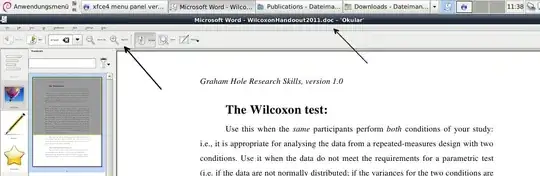
Note the tiny font of the menu compared with the window title (arrows)

aldorado
  • 625
  • 2
  • 11
  • 17

1 Answers1

0

I think I found the solution on my own - maybe it will be useful for somebody: I played around with the "Appearance" in the "Settings" menu. In the "fonts" tab there is a "Use custom DPI value" checkbox. Checking this sets the fontsize to the preferred value. (I hope I translated the menu options correctly from my german menu)

aldorado
  • 625
  • 2
  • 11
  • 17
  • I use xfce 4.12. debian 11 and have similar problem (nomachine 7). The texts are tiny. Sound weird but install deb with su instead of sudo fix this. – Tiana987642 Aug 24 '22 at 13:02